bookmark this page - make qweas your homepage  
Help Center - What's New - Newsletter - Press  
Get Buttons - Link to Us - Feedback - Contact Us  
Home | How to | Directories | Mac | Download | Recommend | Store | New Releases | Popular | Guides | Discount | Rate | Updated | FAQ
Audio & MP3
Video & DVD
Graphics Tools
Security & Anti-Virus
Internet Utilities
System Tools
File Converters
Makers & Designers
Business Finance
Home & Education
Web Authoring
Game Downloads
Screensavers
Pocket Devices

Software New Release
  • New Audio & MP3
  • New Video DVD
  • New Graphic Tools
  • New Internet Tools
  • New File Converters
  • New Business Finance
  • New Designers
  • New AntiVirus
  • New Web Tools
  • New System Tools
  • New PC Games
  • New Screensavers
  • New Home Education
  • New Pocket Devices

  • Software Guides & Faqs
  • Audio MP3 Guides
  • Video DVD Guides
  • Graphic Guides
  • Anti-Virus Guides
  • Internet Guides
  • System Tool Guides
  • Converter Guides
  • Designer Guides
  • Business Guides
  • Education Guides
  • Web Tool Guides
  • Pocket PC Guides
  • Game Guides


  • How to bookmark a web page by the Opera?

    • Firstly, let the Opera open and show the web page that you want to bookmark.

    • Secondly, click the menu "Bookmarks", then click the menu item "Bookmark page...", (or click the short key "Ctrl+T") this will add the current page to your bookmarks. A dialog will be displayed, allowing you to choose a title for the bookmark and specify where you want it to be stored.
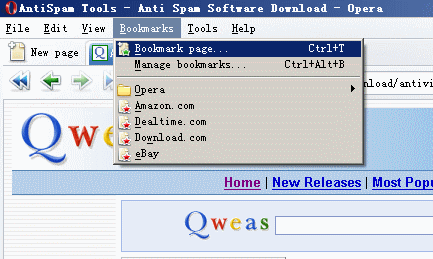
      Opera Bookmark Menu

    • You will see the following dialog, enter a name, select a folder, click the "OK" to save and return.
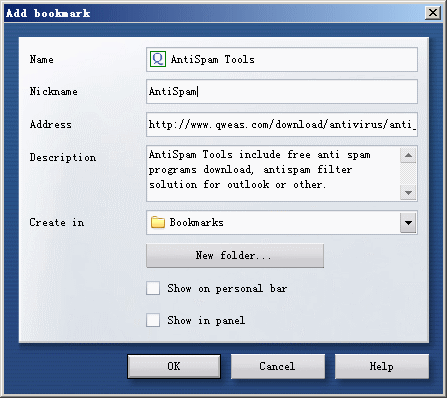
      Opera Bookmark Dialog

    Search - News - Discount - Top100 - Featured - Picks - Hot - Directory - Service - Developer - Partner - Resource
    © 2007 Qweas Home - Privacy Policy - Terms of Use - Site Map - About Qweas