About Qweas     RSS Feeds     BBS Forum Make Qweas.com My Home Page     Bookmark this page Register     Login     Help     Send Feedback  
Windows Mac Linux
Mobile Games Screensavers
Audio/Video Business Communication Desktop Develop Education Games Graphic Home Network Security Servers System Web
Audio Encoders/Decoders , Audio File Players , Audio File Recorders , CD Burners , CD Players , Multimedia Creation Tools , Music Composers , Other , Presentation Tools , Rippers & Converters , Speech , Video Tools
Recommends
SoundTaxi Professional

4Media MP4 to MP3 Converter

Aiseesoft M4V Converter for Mac

Wondershare DVD to Flash Converter

NewsBin Pro

Mil Shield

1CLICK DVD MOVIE

Easy Pdf Publisher Professional

Abdio Hex Editor

Aimersoft Media Converter

SWFText

MemOptimizer

Related Reviews - more
cd to mp3 converter

dvd to mp3 converter

mp4 to mp3 converter

mp3 converter

text to mp3 converter

mp3 converters

cd to wma converter

dvd to mp4 converter

wma converter

ogg converter

dvd to mpeg converter

dvd to divx converter

divx converter

audio converter

video converter

dvd to psp converter

units converters

dvd to ipod converter

dvd to zune converter

mp4 converter

xml converter

dvd to iphone converter

flash converter

currency converters
Home > Audio & Multimedia > Audio Encoders/Decoders > RM-to-MP3-Converter

Detailed Description of RM-to-MP3-Converter 2.0.2
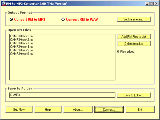


RM-to-MP3-Converter What is RM-to-MP3-Converter?

RM-to-MP3-Converter is for converting RM files (Real Media Files: *.rm, *.rmvb, *.ram, *.ra, *.rmj, etc.) to MP3 files.
It can also convert RM to WAV.

To convert RM to MP3, do according to the below steps:
Launch the software RM-to-MP3-Converter from your computer's "Start > Programs"
Select the optional item "Convert RM to MP3" on the window
Click the button "Set Parameters..." to set MP3 options and save it.
Click the button "Add RM Files to List" to browse and select RM files into the list box
Click the button "Save to Folder..." to browse and select a folder for saving output files.
Click the button "Convert..." to open the converting dialog.
Click the button "Start" on the converting dialog to start converting RM to MP3 and waitting for the procedure to be finished.

To convert RM to WAV, do the same steps as converting RM to MP3 except the following steps:
In the 2nd step, it should be choosed as "Convert RM to WAV".
In the 3rd step, it should be set WAV options rather than MP3.


RM-to-MP3-Converter is designed for:
Win98,WinOther,Win2000,WinXP,WinServer

RM-to-MP3-Converter has the following requirements :

RealOne Player, Sound Card


TAGS OF RM-TO-MP3-CONVERTER

gif to avi swf converter , convert vyf to mp3 , imtoo mov converter , rm converters , bmp to word converter , url - mp3 , converter pdf to jpg , 3gp to gif converter formats , raw to jpeg converter


Site Map | Sort by Letters | Submit Software | Popular Downloads | Editor Picks | New Releases : Mac , Freeware | Updates : Mac , Freeware
Copyright © 2005-2011 Qweas Inc. All rights reserved. Get Buttons - Link to Us - About Qweas - Contact Us - Terms of Service - Copyright Policy - Guidelines - Privacy Policy






