Detailed Description of Daemon Tools Pro Advanced 5.1.0
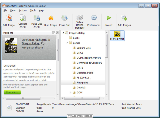 Daemon Tools Pro features are now available in one solution - Daemon Tools Pro Advanced. Create new images or edit existing ones with easy tool - Image Editor. Run it directly from DAEMON Tools or Windows Explorer. You can add, replace, delete files that image contains. Don't forget about support of various image types. Create, edit, manage and burn images with Daemon Tools Pro Advanced!
Daemon Tools Pro Advanced Key Features:
Functionality
* Mount *.mdx, *.mds/*.mdf, *.iso, *.b5t, *.b6t, *.bwt, *.ccd, *.cdi, *.bin/*.cue, *.ape/*.cue, *.flac/*.cue, *.nrg, *.isz disc images to a virtual drive
* Convert images from all supported formats to *.mdf/*.mds, *.mdx, *.iso
* Make .iso, *.mds/*.mdf and *.mdx images of CD, DVD, Blu-ray discs
* Make a compressed disc image or split the image to several files
* Protect images with password
Advanced imaging features
* Create or edit images with powerful Image Editor
* Burn created images to media discs
* Burn images with RMPS data
* Compose your own images of selected type (CD/DVD disc) with preferred file system (ISO9660+Joliet, UDF)
* Master bootable discs or images
* Manage your Image Collection
Media devices virtualization
* Emulate up to 32 DT and SCSI devices in all
* Use 4 virtual IDE devices for advanced emulation
* Mount images to physical IDE/SATA devices via advanced attaching functionality
* Perform image mounting to local NTFS folders
* Get detailed information about physical and virtual devices' properties
* Customize virtual drives: change a drive letter, DVD region, etc.
Advanced user interface with powerful system integration
* Customize user Interface for main application and Image Editor
* Use powerful Command Line Interface for automation purposes
* Enable DAEMON Tools integration to Windows shell
* Use File Associations to mount images right from Windows Explorer or any other file manager
* Customize Windows Explorer context menu for images and virtual devices
Daemon Tools Pro is designed for:
Win2000,WinServer,WinVista,WinVista x64,Win7 x64,Win7 x32,WinXP,
TAGS OF DAEMON TOOLS PRO

p2p program ,
ccproxy 4.3 ,
uml tools ,
usb protecter ,
ftp program ,
step by step daemon tools pro ,
all pro video tools ,
ms project ,
protv tvr 1.1 ,
squid proxy ,
dvd copy pro
|






 RSS Feeds
BBS Forum
RSS Feeds
BBS Forum

