 How to convert PS/EPS files to PDF with PS to PDF Converter? How to convert PS/EPS files to PDF with PS to PDF Converter?
PS to PDF is a windows application which can offer the best performance available to provide speedy conversions from PostScript and Encapsulated PostScript to Portable Document Format (PDF). It supports to convert multiple PS/EPS files into one PDF file. Set encryption options to output PDF files.
Here's the step-by-step guide about how to convert ps/eps file to PDF with PS to PDF Converter.
Step1. Download PS to PDF converter and install it.
Step2. Just clik the button "Add Files" or "Add Directories" to add ps/eps files which you want to convert into the programe list, or you can move the mouse upon the programe list and right press mouse, it appears the pop-up menu, you can also select button "Add files..." or "Add directories...", which has the same function. It looks like the following window:
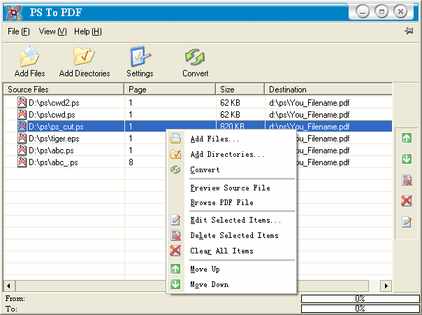
Step3. After the ps/eps files have been added into the programe list, you can update the settings of conversion, you just need to move the mouse upon the button "Settings" and click, then it appears the following "setting" window. If you accept the default settings, all the following you need to do is to click "Convert".
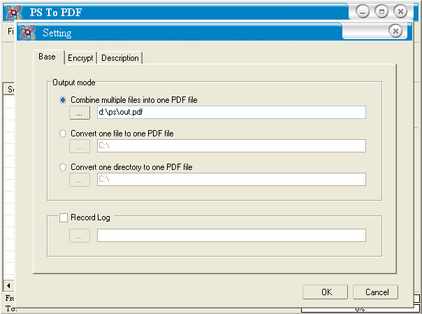
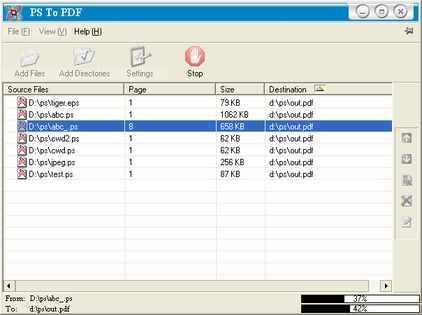
Step4. When all the settings have been asured, all you need to do is to click button "OK" to accept or button "Cancel" to reject. After click button "OK" then click button "Convert", It starts working and looks like the following window. When the program is working, all button are disabled except the button "Stop".
What is PDF?
Portable Document Format. An Adobe PostScript standard file format that is very popular on the web because it preserves the graphical look of a document, unlike HTML, which adapts itself to different browsers and has limited support for fonts.
Related
Software Step by Step Guides and Tutorials:
How to convert ps/eps document to Tiff with PS to Tiff Converter?
How to batch convert PDF to Text (txt)?
How to convert Text to PDF Document?
How to extract image from pdf document?
How to Convert Image to Pdf with Image2pdf?
How to Convert or Write PDF to CD with AutoPlay Me for PDF?
How to Convert PDF Document to TIFF Format with AP PDF to TIFF Converter?
How to decrypt protected PDF files with PDF Password Recovery software?
How to convert CSV to PDF, HTML, DBF, XLS, DOC, MDB, XML, VCS, CHM, RTF, HLP?
|

 RSS Feeds
BBS Forum
RSS Feeds
BBS Forum











