 How to remove Napster DRM, convert Napster DRM WMA to MP3? How to remove Napster DRM, convert Napster DRM WMA to MP3?
Napster Music Store sells music in a DRM protected
WMA format. If you are loooking for a quick way to remove
get around Napster DRM, you may want to check out a shareware
application called SoundTaxi. SoundTaxi
can easily convert DRM protected music files and various audio
files to unprotected MP3, CD, iPod and other MP3 player file
formats at high speed and CD quality-legally. With just a
few mouse clicks you can enjoy all your protected songs on
iPod, any other MP3 player, CD player, mobile phone or PC
- without any restrictions or DRM protection.
Here's the step-by-step guide about how to remove Napster DRM, convert Napster DRM WMA to MP3 with SoundTaxi.
Step1. Free to Download SoundTaxi and install it.
Step2. Launch it and the concise interface is as follows:
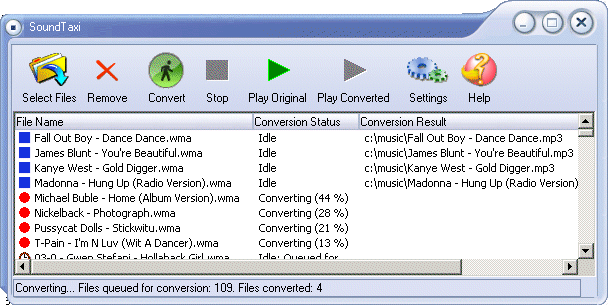
Step3. Click "Select Files" button to load Napster DRM WMA files to be converted to MP3, And the selected WMA files will be displayed.
Step4. Click "Convert" button to start to Remove and convert Napster DRM WMA files.
What is DRM protection?
DRM stands for Digital Rights Management.
DRM doesn't mean just basic copy-protection of digital content (like ebooks, MP3s or DivX videos), but it basically means full protection for digital content, ranging from delivery to end user's ways to use the content. somehow DRM system needs to know when the copying is allowed and when not -- users also have rights to make copies to their closest relatives, etc. So, normally this has been solved by allowing "hops" -- original file can be copied, but the copy of the original file cannot be copied any further. Obviously this also causes problems, if user accidentally deletes the original file, but still has the legal copy of the file.
DRM is an acronym for Digital Rights Management, a broad term used to describe a number of techniques for restricting the free use and transfer of digital content. DRM is used in a number of media, but DRM is most commonly found in video and music files e.g. WMA, M4A, M4P, AA, M4B, WMV and M4V. One of the first and most widely contested DRM systems was the Content Scrambling System (CSS) used to encode DVD movie files.
Related Article and Tutorials:
DRM converter to convert DRM iTunes M4P to MP3 OGG WMA step by step guide.
How to convert Yahoo Music to MP3 step by step?
How to convert MSN Music to MP3 step by step?
How to convert Napster protected music to MP3, iPod step by step?
How to convert Rhapsody Music to MP3 step by step?
|

 RSS Feeds
BBS Forum
RSS Feeds
BBS Forum










