 How to convert your video to MP4 with 2 clicks? How to convert your video to MP4 with 2 clicks?
This guide will describe the basic steps how to convert a video for using with MP4 within 2 clicks, and without launching Alive MP4 Converter in advance.
Alive MP4 Converter allows you to convert AVI to MP4, MPEG to MP4. It supports DivX, XviD, MOV, QT, 3GP, RM, WMV, VOB to MP4 format as well.You can also convert MP4 or other popular videos to DivX, XviD, AVI, MPEG.
At first! Download Alive MP4 Converter at http://www.qweas.com/download/video_dvd/video_converters/alive_mp4_converter.htm, and install it.
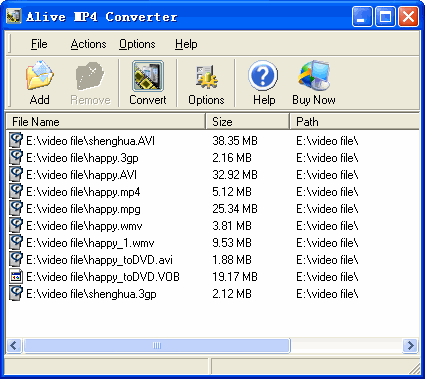
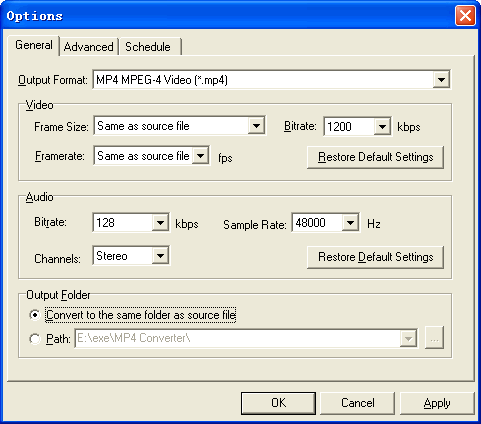
Step1. Right click the video files you want to convert in Windows Explorer, a popup menu will appear, please see below.
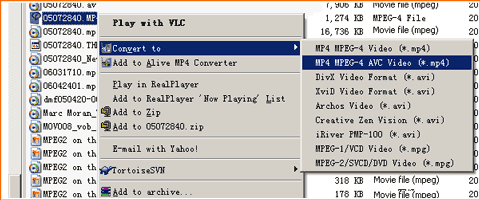
Step2. Click "Convert to" -> "MP4 MPEG-4 Video (*.mp4)" item, done! Alive MP4 Converter will be started, and the conversion will be completed automatically. So easy! So simple!
Related Software Step by Step Guides
and Tutorials:
How to convert MOD to AVI, MPEG, WMV, MP4 with MOD converter
How to convert OGM to AVI/MP4/DVD/MOV with OGM converter?
How to convert M2TS to MKV, AVI, MPEG, MP4, MOV, etc
How to convert DAT files to AVI, DAT to MP4, dat to MPEG?
How to convert DVR MS to MP4 with DVR MS to MP4 converter?
How to convert DAT files to AVI, DAT to MP4, dat to MPEG
How to convert MOD to MP4 with MOD to MP4 converter software?
How to play MP4 files or play MPEG4 files with MP4 Player or MPEG4 Player?
How to convert DVD to PSP MP4 step by step?
How to convert MP4 to MP3 with ImTOO MP4 Video Converter?
|

 RSS Feeds
BBS Forum
RSS Feeds
BBS Forum










