 How to copy AVI RM Video Movie to Palm Pocket PC (PPC)? How to copy AVI RM Video Movie to Palm Pocket PC (PPC)?
Pocket DVD Studio provides you a easy to use interface to copy and record video files(wmv, avi, mpg, mpeg, rm, rmvb, Tivo2go, etc) and DVDs into portable format(wmv, avi) playable on your device.
Step1. Download the Acala DVD copy Pocket DVD Studio
and install it on your PC.
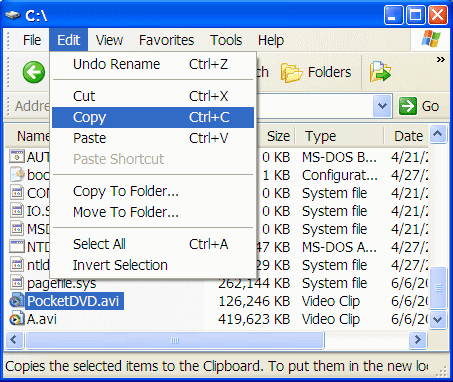
Step2. Open your Windows Explorer, locate your output file (e.g. C:\PocketDVD.avi), select the file and click "Copy" in Explorer's "Edit" menu.
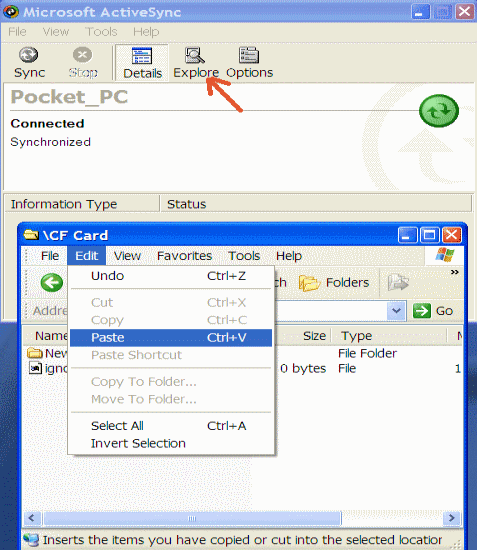
Step3. Put your pocket pc into the cradle and connect the USB cable. Once the synchronization begins, click the "Explore" button on the toolbar of MS ActiveSync. Locate your CF card or SD card directory. In "Edit" menu, click paste.
Tip: To copy large files faster, we recommend you to use a memory card reader to copy & paste. The transfer speed will be several times faster.
Related
Software Step by Step Guides and Tutorials:
How to burn ISO to CD/DVD with ISO to CD/DVD burner software?
How to copy iPod music song to Mac based PC step by step?
How to convert DVD to PSP MP4 step by step?
How to convert Napster protected music to MP3, iPod step by step?
How to convert Rhapsody Music to MP3 step by step?
How to transfer miniDV tapes to DVD video format?
How to transfer music from iPod to Mac/iTunes?
How to copy DVD and play on PSP step by step?
How to convert DVD to iPod video, transfer iPod video to iPod?
How to play DVD movie on my PC step by step?
How to rip DVD and put DVD on Zune step by step?
|

 RSS Feeds
BBS Forum
RSS Feeds
BBS Forum










