 How to convert/rip DVD to MPEG MOV AVI MP4 WMV Blackberry etc. on Mac? How to convert/rip DVD to MPEG MOV AVI MP4 WMV Blackberry etc. on Mac?
This page will show you how to convert/rip DVD to MPEG MOV AVI MP4 WMV Blackberry etc. on Mac step by step with Xilisoft DVD Ripper for Mac.
Xilisoft DVD Ripper for Mac is powerful, all-in-one DVD Ripper designed for Mac users specially.
As DVD Riper, it can rip DVD to video formats like AVI, MPEG, WMV, DivX, RM, MOV, 3GP, 3GP2, MP4, MPEG4 AVC, BlackBerry 3GP, BlackBerry AVI, BlackBerry MPEG-4 Video(*.mp4), etc. As DVD Audio Ripper, it can rip DVD to audio formats like MP3, WAV, WMA, AAC, AC3, M4A, OGG, RA, AU, BlackBerry AMR Audio etc.
Step1. Please download Xilisoft DVD Ripper for Mac and run it on your Apple computer.
Step2. Load DVD
Insert DVD to your DVD-ROM. Start up DVD Ripper for Mac loading DVD automatically.
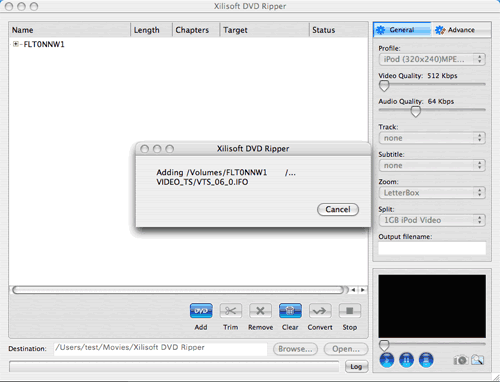
Or you can click “Add” button to load DVD disc.
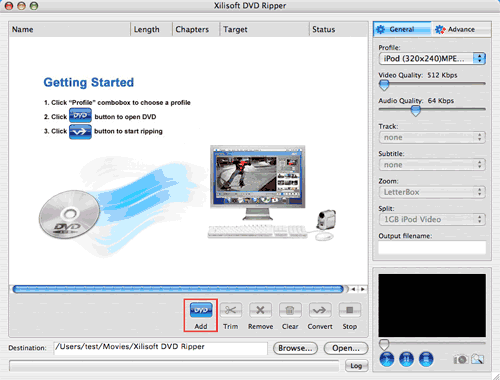
Step3. Set the output format
After loading the DVD, please highlight the titles or chapters you want to set, and then select the profile from the “Profile” pop-up menu on the right “General” panel.
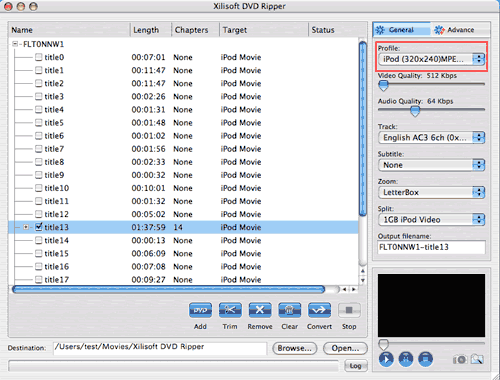
Tip: After setting the profile for the selected files, you can adjust parameters by the “Advance” panel.
Step4. Set the output file destination
Click the “Browse” button to choose the path where you want to save the output files in.
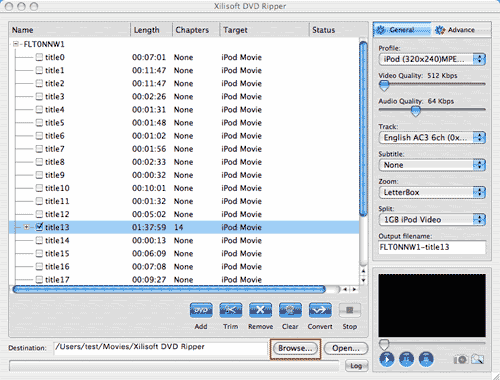
Step5. Preview source file
Select the file you want to view and click the “Play” button in the preview window right below. You can “Pause”, “Stop” when the movie is playing.
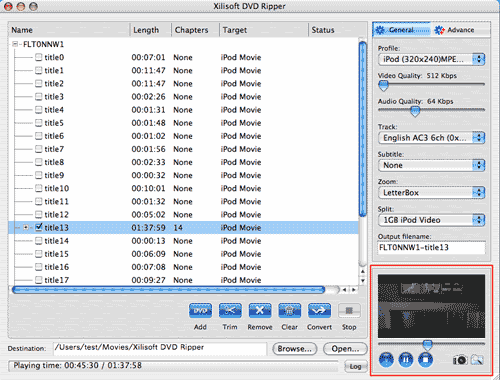
Tip: This function is only for previewing the source file.
Step6. Start converting
After everything is OK, please click the "Convert?button to start ripping.
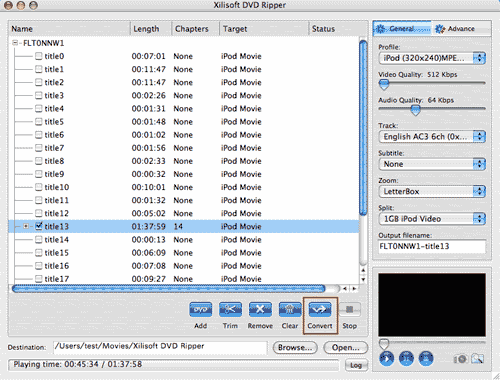
Tip: After setting the profile for the selected files, you can adjust parameters by the “Advance” panel.
Step7. View the conversion result
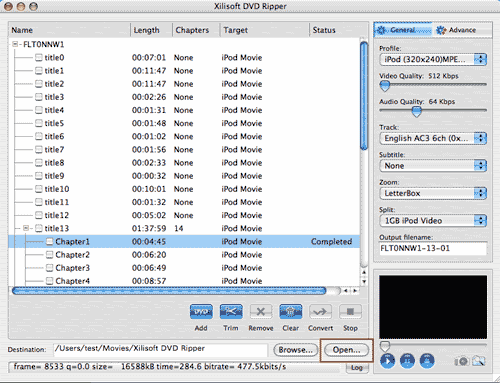
After the conversion is done, click the “Open” button at the bottom of the main interface to browse the output files.
More Mac Software:
 Mac
Software - Audio & video software for Mac, Parallels desktop for Mac, Flash software & graphic software for Mac etc. Mac
Software - Audio & video software for Mac, Parallels desktop for Mac, Flash software & graphic software for Mac etc. |
 Mac
Video Tools - Mac DVD ripper, Mac DVD
to iPhone iPod MP4 video converter, Mac DVD copy, Mac DVD Creator etc. Mac
Video Tools - Mac DVD ripper, Mac DVD
to iPhone iPod MP4 video converter, Mac DVD copy, Mac DVD Creator etc. |
Related Step by Step Guides and Tutorials:
How to convert AVI MPEG MP4 to PS3 iPod FLV Apple TV Zune etc. on Mac?
How to convert AVI MOV WMV 3GP MP4 VOB MPEG to iPod on Mac?
How to convert MPEG MOV 3GP VOB AVI to MP4 M4A AAC on Mac?
How to convert iTunes DRM protected music to MP3 AAC AIFF WAV on Mac with DRM converter for mac?
How to convert DVD to iPhone on Mac OS X step by step?
How to convert DVD to Apple TV on Mac OS X?
How to convert DVD to MP4 on Mac step by step?
How to convert DVD to iPod MP4 video and M4A audio on Mac?
|

 RSS Feeds
BBS Forum
RSS Feeds
BBS Forum











