 How to Rename MP3 Audio Files Name Using the MP3 Plugin with NameWiz? How to Rename MP3 Audio Files Name Using the MP3 Plugin with NameWiz?
As its name imply, NameWiz is a name wizard. That is, it will let you rename files or folders in any which way you want. Unlike its predecessor, NameWiz v4 can be further expanded using plugins. NameWiz already include many renaming functions, such as sequential using numbers, letters or both. Delete, move, swap, insert, change, all or parts of file names etc. The automatic preview let you quickly view the result along with potential errors. The editable log feature allows you to undo some or all renaming you have done since the log was last cleared. No need to worry about mistakes.
Step1. DownloadNameWiz and install it on your PC.
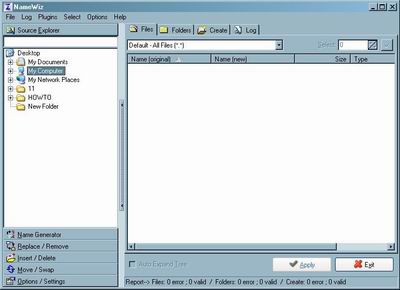
Step2.First, you need to make sure that the MP3 plugin is loaded, go to Plugins menu and select MP3, you are now ready to use the MP3 plugin window!
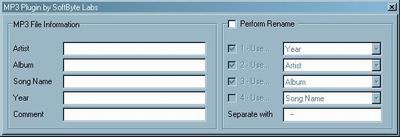
Step3. Go to the Source Explorer tab and select the folder of your MP3's files to be rename or viewed. Click on Perform Rename check box of the MP3 window to activate it.
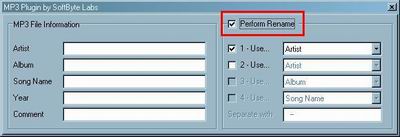
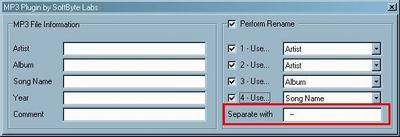
Step4.You will now see 4 check boxes with a drop down menu so you can select the order of your criteria. A field called Separate with, let you separate the headers of the MP3 File Information (on the left side of the Perform Rename) you can view your actual MP3's headers.
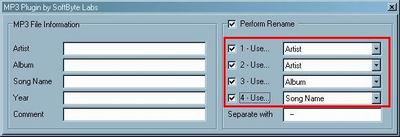
Step5. Let you separate the headers with any characters you like, the default is a dash ( - ), but you can use spaces, or any characters of your choosing.
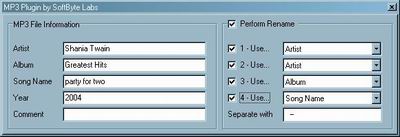
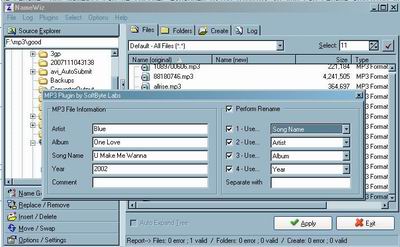
Step6. In the Result List window, click on one MP3 at a time and NameWiz will retrieve the actual information of your MP3 and show you the result in the MP3 File Information (some MP3's do not have complete details of the file). It will show you the Artist name, Album name, Song name, Year and any comments that was added to this MP3.
Step7. Click the "Apply" button to rename mp3's audio files.
Related Step by Step Guides and Tutorials:
How to edit MP3 tag with Music MP3 Tag Editor?
How to create M3U playlist with MP3 files?
How to convert DAT to MP3 with DAT to MP3 converter?
How to convert DVF to MP3, DVF to WAV with DVF converter.
How to convert PPT to PDF/DVD/AVI with PPT converter?
How to burn ISO to CD/DVD with ISO to CD/DVD burner?
How to convert DVR-MS to AVI with DVR-MS to AVI converter.
How to recover corrupted Zip files with Zip repair tool?
|

 RSS Feeds
BBS Forum
RSS Feeds
BBS Forum











