 How to split MPEG, MPG, SVCD, DVD, VCD with Quick MPEG Splitter? How to split MPEG, MPG, SVCD, DVD, VCD with Quick MPEG Splitter?
MPEG: MPEG video is a series of video standards defined by the Moving Picture Experts Group (MPEG)
MPEG-1: Approximately VHS-quality, commonly used for Video CD (VCD) and CD-ROM.
MPEG-2: DVD-quality, commonly used for DVD, digital television, set-top boxes, etc.
Quick MPEG Splitter is the easy-to-use and powerful MPEG-1 splitter and MPEG-2 cutter to split large MPEG file into smaller MPEG video clips, or to extract manually selected segment of an MPEG video file to new MPEG video file.
Function 1: Extract selected segment of the MPEG video file.
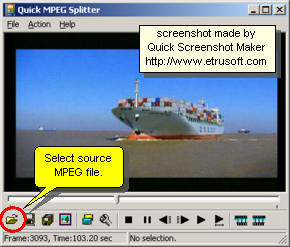
Step1. Please download Quick MPEG Splitter and install this software. Click the "Open" button to select the source MPEG video file.
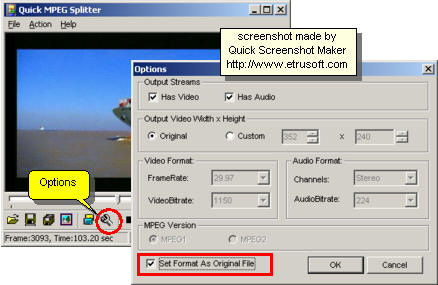
Step2. Click the "Options" button to open the Options Dialog. Set the output MPEG video format and audio format. You'd better use "Set Format as Original File" function.
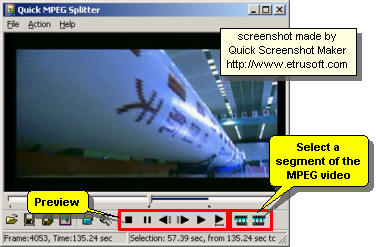
Step3. Set the playback buttons to preview the MPEG video file. Use "Selection Start" and "Selection End" buttons to select a segment of the MPEG video.
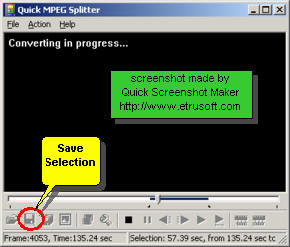
Step4. Click the "Save Selection" button to export selected segment of source MPEG video file to new MPEG video file.
Function 2: Split source MPEG video file to equal-size parts of MPEG video files.
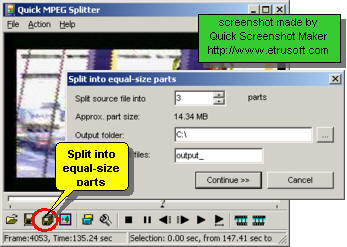
Click the "Split into equal-size parts" button to split the source MPEG video file into equal-size parts of MPEG video clip files.
Related Step by Step Guides and Tutorials:
Mac iTunes M4P converter to convert iTunes DRM protected m4p to mp3 aac aiff wav on Mac Guide.
How to convert M4a to MP3, iTunes to MP3 AAC AIFF WAV on Mac?
How to remove DRM protection iTunes with DRM removal software on Mac?
How to convert DRM protected wma files to MP3 AAC AIFF WAV on Mac?
How to convert TOD to AVI, MPEG, WMV on Mac
How to convert M2TS to MKV, AVI, MPEG, MP4, MOV, etc
How to play AVCHD MTS files with MTS Player? what is MTS?
How to convert DBX to PST, EML with DBX Converter?
How to recover MS Outlook PST files and import recovered PST files to MS Outlook?
|

 RSS Feeds
BBS Forum
RSS Feeds
BBS Forum












