 How to convert DVD to Apple TV format MP4 M4V (MPEG-4) H.264? How to convert DVD to Apple TV format MP4 M4V (MPEG-4) H.264?
The page will show you how to convert DVD to Apple TV format MP4 M4V (MPEG-4) H.264 step by step with Aimersoft DVD to Apple TV Converter. The detailed steps are as follows:
Step1. Please download Aimersoft DVD to Apple TV Converter, install and run it; you can know more about it by visiting here: http://www.qweas.com/download/video_dvd/video_converters/aimersoft_dvd_to_apple_tv_converter.htm
Step2. Load DVD file
Load your DVD into the program: Please click "Load DVD" button or directly click the “File -> Load DVD folder” in the main interface, then select your DVD-ROM in the pop-up window and press the "OK" button. You also can click “Load File” button to import IFO file from your computer hard disk.
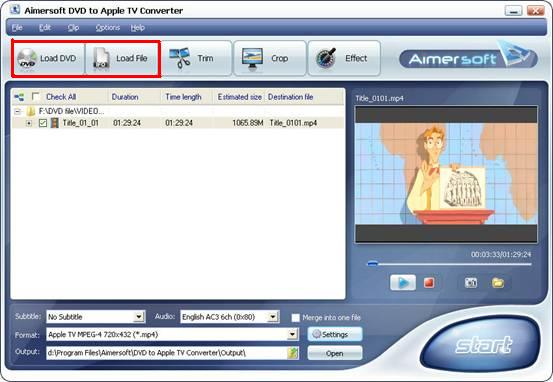
Step3. Select the chapters you want to convert.
Highlight the title which contains the whole episodes of DVD, such as title 01 in the following screenshot. Or if you like, you can select certain chapters to convert: Press the little button before “Check All” on the interface to find all the chapters in the file.
This software fully supports all kinds of DVD, such as regular DVD movie and DVD MTV. DVD MTV will have several titles, so you can select the desire MTV titles to convert.
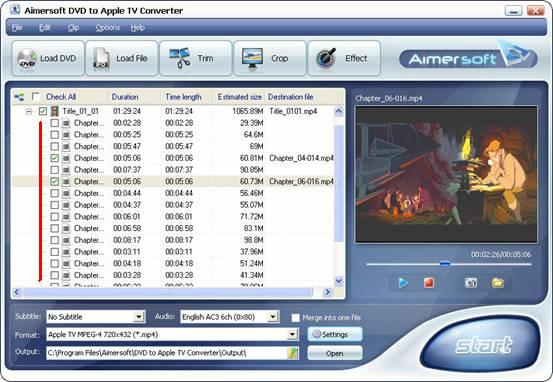
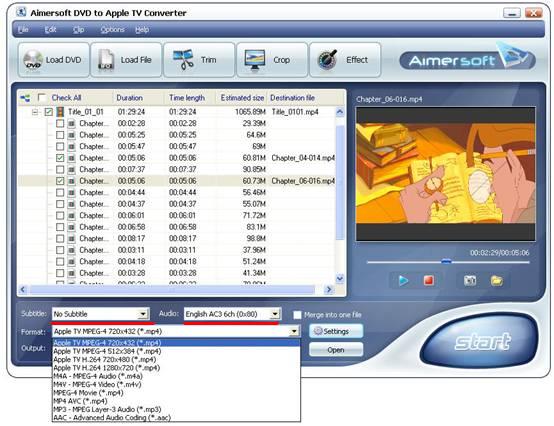
Step4. Select the output Apple TV Video format, Subtitle and Audio
Format: This software can convert DVD to MPEG-4 and H.264 format which are fit for Apple TV; If you care about output video quality, you can select “Apple TV h.264 1280*720 (*.mp4)”, It will provide you the best movie quality (HD quality), no other Apple TV converter can rip DVD to Apple TV with such high resolution, but this will take a little long time to convert video.
If you care about conversion time, just select lower resolution, the quality is also good.
Subtitle: Regular DVD movie usually has several subtitles, like English, French, German, etc. You can select anyone according to your need. You also can select “No Subtitle”
Audio: Select Audio is the same as select Subtitle.
Step5. After all things done, click “Start” to start conversion.
Related Software Step by Step Guides
and Tutorials:
How to convert DVD to iPhone Video MP4 step by step?
How to download YouTube Video, convert YouTube to PS3 Zune Apple TV iPod 3GP?
How to convert DVD to PSP MP4 step by step?
How to convert video files to iPod format step by step?
How to copy DVD and play on PSP step by step?
How to convert AVI MPEG MP4 to PS3 iPod FLV Apple TV Zune etc on Mac?
How to convert DVD to iPod video, transfer iPod video to iPod?
How to rip/convert DVD to iPod step by step?
How to convert MP4 to PSP with Mooma Video to PSP Converter?
How to record iTunes radio stations onto iPod?
How to rip DVD and put DVD on Zune step by step?
|

 RSS Feeds
BBS Forum
RSS Feeds
BBS Forum











