 How to convert video to MP3 step by step? How to convert video to MP3 step by step?
Alive Video Converter is the professional video converter
that converts Convert AVI files to DVD, VCD, MPEG, or SVCD
forat. With a very easy to use interface you can also extract
audio tracks from video files and save them as MP3 format.
It supports AVI(DivX, XviD, MS MPEG4, Uncompressed, Cinepak and other), MPEG-1, MPEG-2, WMV, ASF, RM or QuickTime format, and allows you to convert AVI, MPG, MPEG, WMV, MOV, ASF, QT into AVI, MPEG-1, MPEG-2, WMV, RM or MP3 files.
What is MP3?
MP3 (technically, MPEG Audio Layer-III ) is a standard format for compressing digital audio . MP3 squeezes audio files to about one tenth of their original size, while maintaining close to CD quality. Songs in MP3 format can be downloaded from the Internet, created from prerecorded music, or recorded from scratch. They can be played on personal computers, Walkman-style portable players (like the Rio) or one of the new generation of dual-mode MP3/audio CD players.
Step1. Free Download and Installation
Download Alive Video Converter from http://www.qweas.com/download/video_dvd/video_converters/alive_video_converter.htm, install and run it.
Step2. Select video file(s)
Click "Add files" button on top of main window to select video file(s) you would to convert.

Step3. Start converting
Click "Start" button on bottom of main interface to start converting.
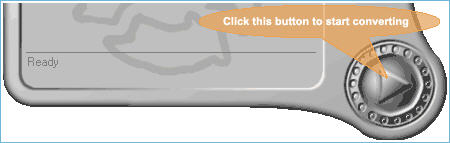
After you click "Start" button, you would be prompted by a window that allows you to select the output format, such as AVI, MPEG, WMV, RM or MP3, change the video quality of output video and the ouput directory.
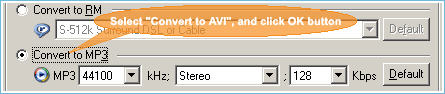
Please select "Convert to MP3" item, and then click "OK" button to start your converting.
Related Article and Tutorials:
How to rip DVD and put DVD on Zune step by step?
How to convert DVD to RM RMVB with DVD to RM RMVB converter?
How to convert flash SWF movie to iPod with ANVSOFT Flash to iPod Converter?
How to convert MIDI to WAV with MIDI to MP3 Converter ?
How to convert MP4 to MP3 with ImTOO MP4 Video Converter?
How to convert MP4 to PSP with Mooma Video to PSP Converter?
How to transfer music and video between iPods ?
How to Convert AVI, WMV, MPG, ASF, MPEG to Flash step by step?
|

 RSS Feeds
BBS Forum
RSS Feeds
BBS Forum










