 How to transfer songs from iPod to Computer or iTunes Music Library? How to transfer songs from iPod to Computer or iTunes Music Library?
Tansee
iPod Transfer is an ultimate application for transferring songs
and videos from your iPod to a Windows based PC, you can search songs
or videos by title, artist, album, genre... Tansee iPod Transfer is a
sound of blessing for frustrated Apple's iTune users who can't copy music
files from iPod to pc desktop or laptop since iTune blocks iPod-to-computer
songs transfer.
Part 1. Here's the step-by-step guide about how to transfer songs
from iPod to Computer with Tansee iPod Transfer.
Step1. Download Tansee iPod Transfer and install it.
Step2. Connect iPod to your computer.
Step3. Launch Tansee iPod Transfer and all the content of your iPod, including music and videos will display automatically, screenshot as follows:
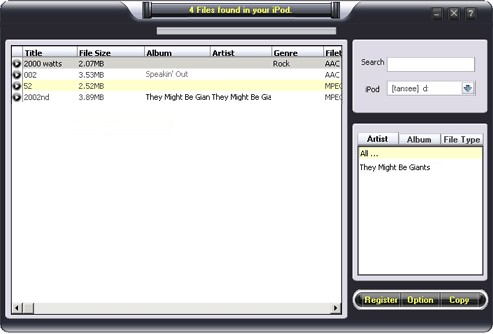
Step4. Select the files to be transferred to your computer by click them. Ctrl key for multi-files select. Click right button of your mouse can select all songs.
Note: you can only select first 5 songs if you haven't purchase.
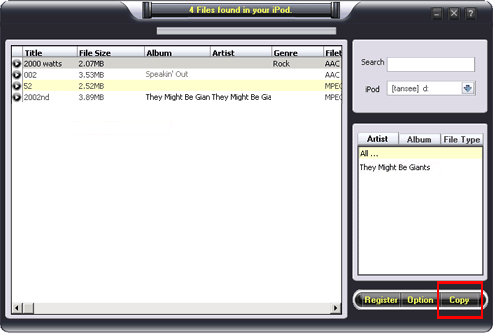
Step5. Click "Copy" button to select output path and start to transfer songs or videos to your computer:
Part 2. How to Transfer Song from iPod to iTunes Music Library?
Step1. Transfer your songs / videos to a folder on your computer by Tansee iPod Transfer, e.g. "C:/music" .
Step2. Run iTunes, click "File", click "Add Files to Library..." or "Add Folder to Library..." , select the songs in folder C:/music.
Or simply run iTunes, Drag your files in "C:/music" to your iTunes music Library.
Related Step by Step Guides and Tutorials:
How to convert m2p to mp4 for iPod?
How to record iTunes radio stations onto iPod?
How to convert flash SWF movie to iPod with ANVSOFT Flash to iPod Converter?
How to transfer music and video between iPods ?
How to rip/convert DVD to iPod step by step?
How to update ipod video through itunes step by step?
How to convert JPG JPEG BMP to iPod movie with Photos to iPod Movie step by step?
How to convert video files to iPod format step by step?
|

 RSS Feeds
BBS Forum
RSS Feeds
BBS Forum











