 How to convert AVI to PSP (MP4, H.264/MPEG-4) with ImTOO PSP Video Converter? How to convert AVI to PSP (MP4, H.264/MPEG-4) with ImTOO PSP Video Converter?
ImTOO PSP Converter supports converting video file format including DVD, VCD, AVI, WMV, MP4, MOV, 3GP, animated GIF, RM, ASF to PSP video and audio file formats like WMA, OGG, AAC, M4A, WAV, AC3 to PSP MP3.
Step1. Download ImTOO PSP Video Converter and install.
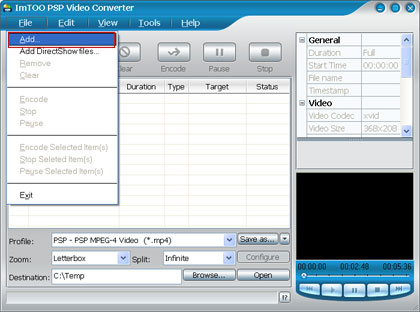
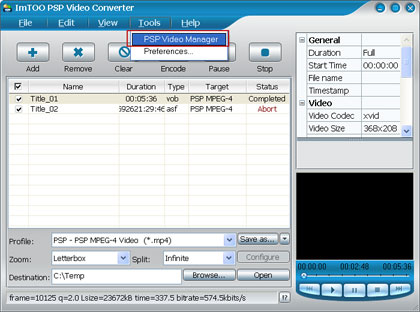
Step2. Load files you'd like to convert: Add the video or audio files you'd like to convert by selecting 'Add' in the "File" drop down list or clicking "Add" button in the main interface.
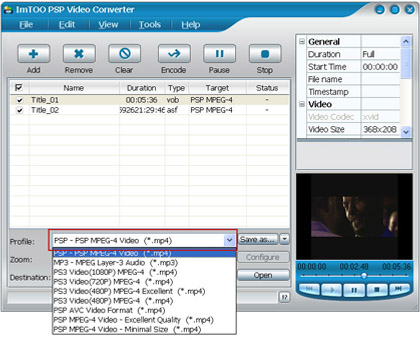
Step3. Set output format: In "Profile" drop down list box, you may select output format. The software allows setting different output formats according to different files.
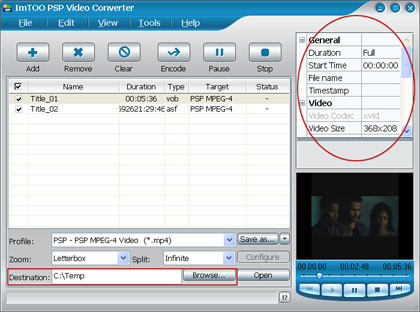
Step4. Set Parameters(Optional)
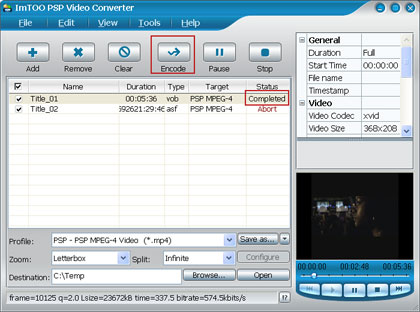
Step5. Start converting: Click "Encode" in the File menu to start converting. And after a successful conversion, the info "Completed" will show.
Step6. Copy the converted PSP videos to PSP
- Make sure your PSP is successfully connected to the computer through USB, check the Connection status in your PSP “setting” menu.
- Choose the “PSP Video Manager” in the “Tools” menu.
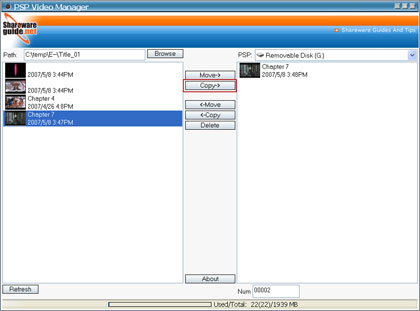
- Select the converted file you want in the pop-up window and click “Copy” to pull it to your PSP.
Related
Software Step by Step Guides and Tutorials:
How to convert AVI files to DVD with AVI to DVD Converter for Mac?
How to convert AVI MPEG 3GP VOB MOV to DPG videos for playing on DS?
How to convert AVI MPEG MP4 to PS3 iPod FLV Apple TV Zune etc on Mac?
How to rip DVD movie to PSP, IFO to PSP on Mac step by step?
How to convert video files to iPod format step by step?
How to convert/rip DVD movie to BlackBerry AVI?
How to copy AVI RM Video Movie to Palm Pocket PC(PPC)?
How to convert DVR-MS to PSP movie step by step?
How to convert video to AVI step by step?
How to convert and burn VOB AVI to DVD step by step?
|

 RSS Feeds
BBS Forum
RSS Feeds
BBS Forum











