 How to fix repair movie video with
EnhanceMovie?
How to fix repair movie video with
EnhanceMovie?
The easy-to-use video enhancement software! Whether you want to clean up noisy video, increase lightness, brightness or contrast, correct white balance, handle interlaced video, fix blurred or purple images and others, or you want to make your home videos look like an old 30s movie or very futuristic, EnhanceMovie is a must!
Step1. Please download EnhanceMovie and install this software. Open your file with EnhanceMovie by clicking

Step2. Right-click the  Sharpening filter's icon and select Add and Customize from the drop-down menu: Sharpening filter's icon and select Add and Customize from the drop-down menu:
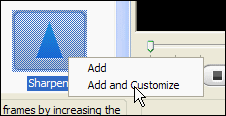
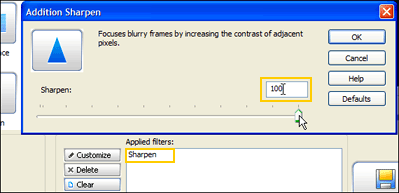
Step3. This will add the filter to the list of applied filers and open the filter's settings dialog. Move the slider to the maximum (100) and click OK.
Hint:You can also type in the values using your keyboard.
Related Article and Tutorials:
How to convert and burn VOB AVI to DVD step by step?
How to split MPEG, MPG, SVCD, DVD, VCD with Quick MPEG Splitter step by step?
How to convert Yahoo Music to MP3 step by step?
How to convert MSN Music to MP3 step by step?
How to convert Napster protected music to MP3, iPod step by step?
How to convert Rhapsody Music to MP3 step by step?
|
|
|

 RSS Feeds
BBS Forum
RSS Feeds
BBS Forum











