 How to restore the system file? How to restore the system file?
MagicTweak is a special program designed to optimize and personalize Microsoft Windows. It provides one-stop, instant access to a variety of Windows settings that can be altered for a friendlier Windows environment.
Step1. Please download MagicTweak from http://www.qweas.com/download/system/system_optimizers/magictweak.htm and install it.
Step2. Run the MagicTweak, and click the "Options and Help" button to choose the "Backup/Restore". Select the files which you want to Restore.
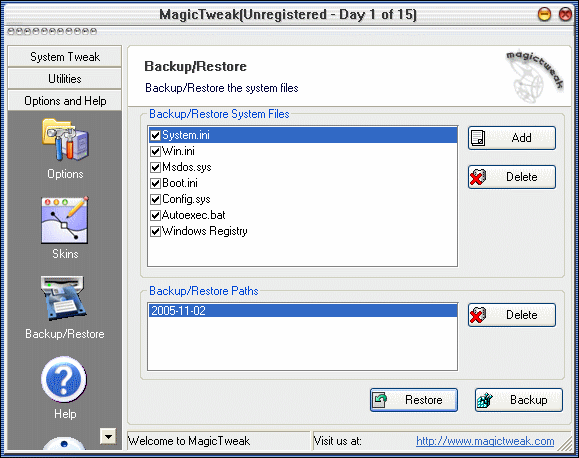
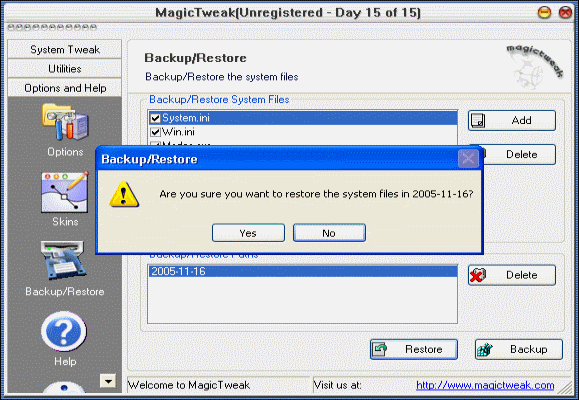
Step3. Click "Restore" button to start, also it will open a windows for choose YES/NO make sure if you want to restore the system files.
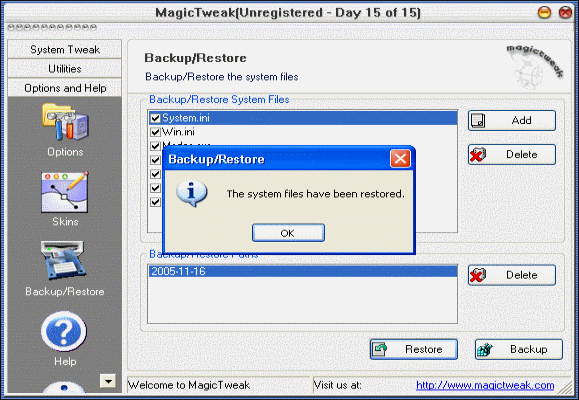
Step4. Click OK, your system files have been restored.
Related
Software Step by Step Guides and Tutorials:
How to clean and repair registry?
How to Back up a Windows 7-based Computer?
How to Back up a Windows Vista-based Computer?
How to Back up a Windows XP or Windows Server 2003-based Computer?
How to recover files from formatted hard drives?
How to recover files from Raw Hard Drive?
How to recover lost files from re-partitioned hard drives?
How to convert hard disk files between FAT/FAT32 and NTFS format?
How to recover NTFS files with NTFS data recovery software?
How to convert between NTFS to FAT32? NTFS vs FAT32?
|

 RSS Feeds
BBS Forum
RSS Feeds
BBS Forum











