 How to save/download/capture/rip/record RTSP streams with RM Downloader? How to save/download/capture/rip/record RTSP streams with RM Downloader?
The guide will show you how to save/download/capture/rip/record RTSP streams with RM Downloader step by step. The detailed steps are as follows:
Step1. Please download RM Downloader, install it and run it; you can know more about it by visiting here: http://www.qweas.com/download/audio_mp3/rm_tools/rm_downloader.htm
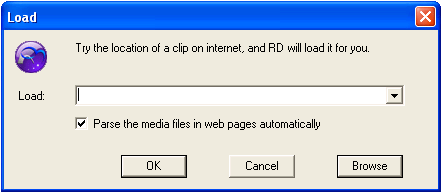
Step2. Click on the Load button on RD's screen to open the URL Loading screen. In the "Load" box that opens, type in: "rtsp://aural1.justconcerts.com/justconcerts/sessions/k-os/020730/bling_bling.rm". Then click 'ok', RD will load the stream for you.
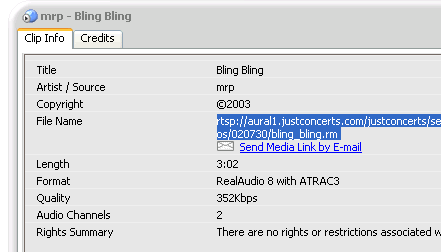
If you want to record the stream which RealPlayer is playing, single click the "File" drop-down menu on the RealPlayer interface. Choose "View file info" under "Clip Properties", Copy "rtsp://aural1.justconcerts.com/justconcerts/sessions/k-os/020730/bling_bling.rm" in the Clip Info Box. Paste the address "rtsp://aural1.justconcerts.com/justconcerts/sessions/k-os/020730/bling_bling.rm" in the RD's loading url box. Then click 'ok', RD will load the stream for you.
If the stream has been sucessfully loaded, you'll get the message "Please press 'Start' to download the ready files". If not, you'll get an error message.
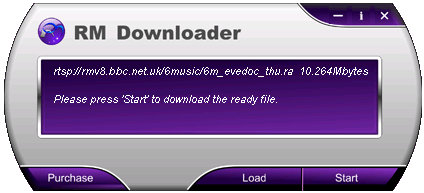
Step3. Click on the Start button on the right of RD's screen to start recording.
Real Time Streaming protocol (RTSP)
Real Time Streaming Protocol, RTSP, is an application-level protocol. Its goal is to offer robust protocol that can stream multimedia over multicast and unicast in "one to many"-applications. It also supports interoperation between clients and servers from different vendors. It's currently a proposed standard.
RTSP protocol is used for years for streaming Real Video and Streaming Real Audio. And starting with Windows Media Player 9 Series, Windows Media Services 9 Series and Windows Server 2003 RTSP Protocol is now the default protocol for streaming Windows Media.
Differences between RTSP and HTTP
The RTSP is intentionally similar in syntax and operation to HTTP/1.1. However, it differs in a number of important aspects from HTTP:
- RTSP introduces a number of new methods and has a different protocol identifier.
- An RTSP server needs to maintain state by default in almost all cases, as opposed to the stateless nature of HTTP.
- Both an RTSP server and client can issue requests.
- Data is carried out-of-band by a different protocol. (There is an exception to this.)
- RTSP is defined to use ISO 10646 (UTF-8) rather than ISO 8859-1, consistent with current HTML internationalization efforts.
- The Request-URI always contains the absolute URI.
This makes "virtual hosting" easier, where a single host with one IP address hosts several document trees.
RTSP URL is in form rtsp://media.example.com:554/twister/audiotrack, where
- rtsp:// is the identifier for TCP rtsp scheme (rtspu:// is used for UDP scheme)
- 554 is the assumed port for Real-Time Streaming Protocol
- twister is the name of the presentation
- audiotrack is the name of certain stream in the presentation (this is optional)
The following ports have been registered with IANA:
rtsp 554/tcp Real Time Stream Control Protocol
rtsp 554/udp Real Time Stream Control Protocol
rtsp-alt 8554/tcp RTSP Alternate (see port 554)
rtsp-alt 8554/udp RTSP Alternate (see port 554)
RTSP Stream Player - RealPlayer
Only RTSP can deliver SureStream files with multiple bit-rate encoding. SMIL, RealText, and RealPix also require RTSP. RTSP uses TCP for player control messages, and UDP for video and audio data. RTSP can also use TCP to deliver data, but this is not recommended. Use RTSP with RTSP-compatible players such as RealOne Player, RealPlayer, and QuickTime Player.
Related Step by Step Guides and Tutorials:
How to rip music from BBC radio station?
How to record iTunes radio stations onto iPod?
How to convert flash SWF movie to iPod with ANVSOFT Flash to iPod Converter?
How to transfer music and video between iPods ?
How to rip/convert DVD to iPod step by step?
How to quickly create an new ISO files or an new CD/DVD.
How to convert ISO to CSO or convert CSO to ISO?
How to convert MP3 to OGG or convert OGG to MP3?
|
|
|

 RSS Feeds
BBS Forum
RSS Feeds
BBS Forum











