 How to transfer phone (photo, mp3) files to pc with NexyFILES?
Use your cell phone as a camera?
MP3 Player? Tired of wasting your time uploading and downloading
files? Try NexyFILES! Discover the full power of your phone
with easy to use interface to transfer files between your
PC and mobile phone. Download shots you've made on your phone,
upload MP3's, ringtones, themes. More than 100 phone models
are supported. Bluetooth, IrDa, cable connections are welcome.
Step1. Please download NexyFILES
, install and run it
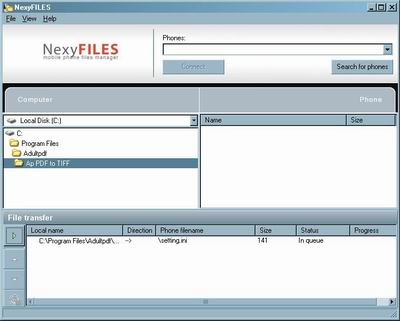
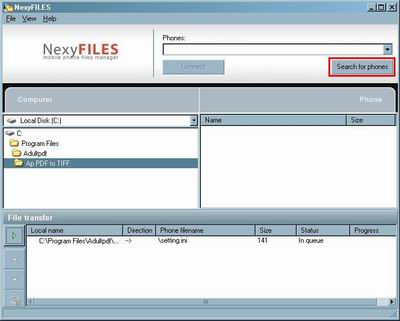
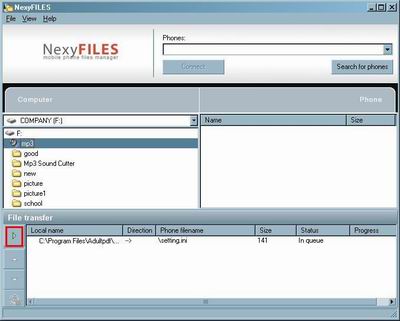
Step2. Click the "Search for phones" button to search
your phone.
Step3. Now the program is running click file in the
top left corner and add one, or however many you want.
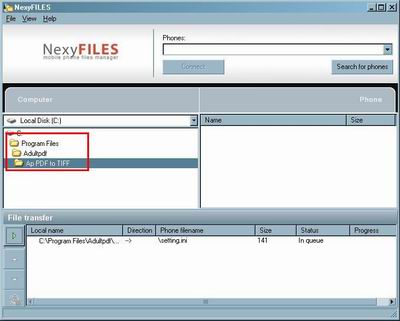
Step4. The box we've highlighted in red is the contents
table, it show will show all the files you've chosen.
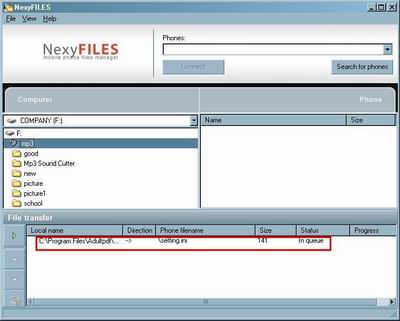
Step5. Click this button to transfer files between
your phone and pc.
Related Article and Tutorials:
How
to translate English word to Russian word?
How
to transfer music and video between iPods ?
How
to transfer miniDV tapes to DVD video format?
How
to transfer photo to DVD, create slide show on DVD?
|
|
|

 RSS Feeds
BBS Forum
RSS Feeds
BBS Forum











