 How to convert JPG photos to DVD/SVCD/VCD compatible MPEG files? How to convert JPG photos to DVD/SVCD/VCD compatible MPEG files?
IphotoDVDis a powerful but easy to use utility that allows you to archive digital photos into DVD/SVCD/VCD compatible MPEG files with hundreds of transition effects. The transformation includes photo to dvd, photo to vcd, photo to mpeg, jpg to mpg and jpg to mpeg. You can create photo video, photo show on DVD/SVCD/VCD easily.
Step1. Please download IphotoDVD , install and run it.
Step2.Create a new project
Step3.Add photos
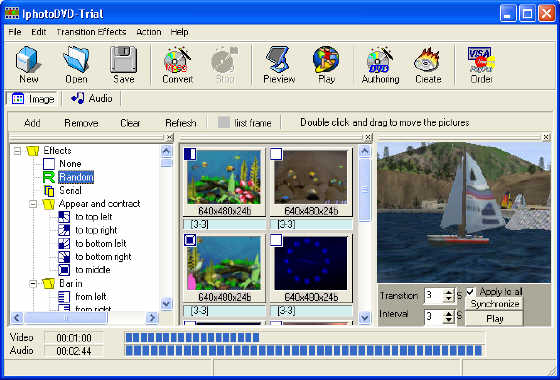
Step4.Select transition effects
Step5.Add background music
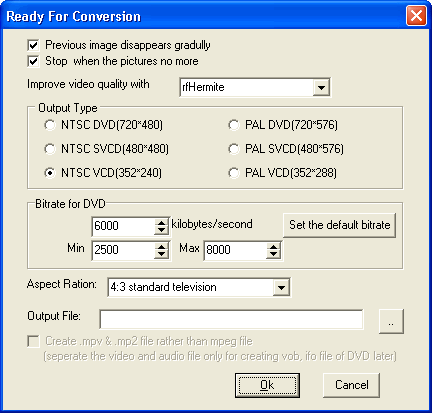
Step6.Make the MPEG file
Related Software Step by Step Guides
and Tutorials:
How to capture or convert DVD movie to Bitmaps(bmp) image step by step?
How to convert JPG JPEG BMP to iPod movie with Photos to iPod Movie?
How to convert Word Doc/RTF document to image (Jpeg/Jpg/Tiff/Bmp/Eps/Ps) file?
How to convert DAT files to AVI, DAT to MP4, dat to MPEG?
How to compress JPEG with JPEG Image Compressor?
How to convert IMG to ISO with IMG to ISO converter software?
How to transfer photo to DVD, create slide show on DVD?
How to make/build Slideshow Screensaver with Digital Photo?
How to convert PDF to Image with AP PDF to Image Converter?
|

 RSS Feeds
BBS Forum
RSS Feeds
BBS Forum










