 How to convert MPEG to MPEG4 video? How to convert MPEG to MPEG4 video?
Allok MPEG4 Converter is a best MPEG4 decoder, which is also a best MPEG to MPEG4 converter to convert MPEG to MPEG4 video easily and fast.
Allok MPEG4 Converter is a powerful and handy video converter which helps you convert all popular video/movie to MPEG4 format. The MPEG4 Converter converts video files for your portable media player (MP4 player), iPod, Sony PSP, Cellular Phone, Pocket PC, Palm etc .Integrated world class MPEG4 encoder brings you amazing video quality with super fast conversion speed. Allok MPEG4 Converter support so many portable media player (MP4 player) such as Apple iPod, Sony PSP, Acrchos AV400, Archos AV500, Archos AV700, Archos Gmini402, iRiver PMP-100, Creative Zen Vision, etc. It's so easy that anyone can use it, works in just a few quick steps and takes only minutes, even seconds!
Step1. Download the Allok MPEG4 Converter Allok MPEG4 Converter from http://www.qweas.com/download/video_dvd/video_converters/allok_mpeg4_converter.htm
and install it on your PC.
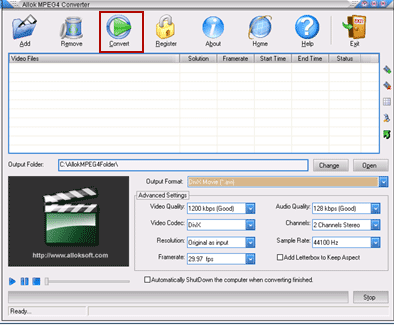
Step2.Launch the MPEG to MPEG4 Converter and the interface is as follows:
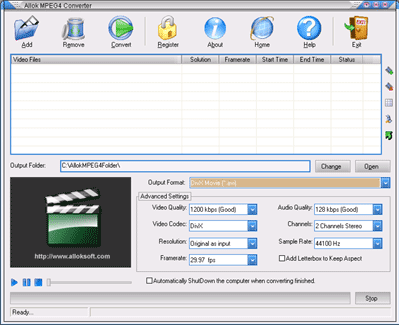
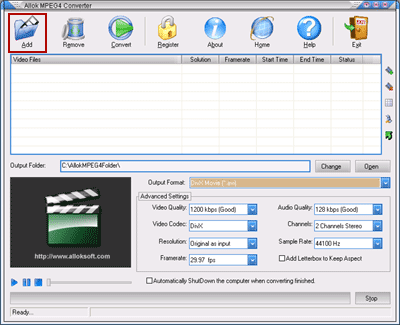
Step3. Click "Add" button to load MPEG files to be converted MPEG4 video format:
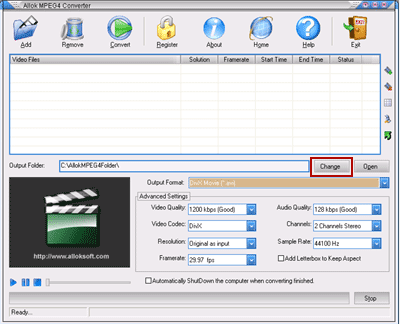
Step4.Click "Change" button to choose an output path for MPEG4 file:
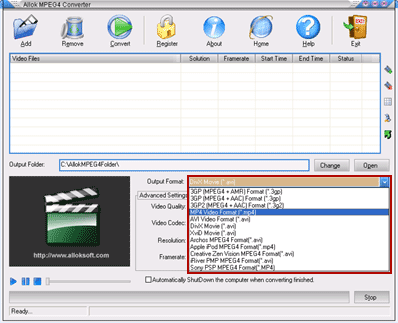
Step5.Click "Output Format" combo-box to choose appropriate MPEG4 format accroding to your need as output file:
Step6.Click "Convert" button to start to convert MPEG to MPEG4 video format:
Related
Software Step by Step Guides and Tutorials:
How to convert DVD to PSP MP4 step by step?
How to convert MSN Music to MP3 step by step?
How to convert Napster protected music to MP3, iPod step by step?
How to convert Rhapsody Music to MP3 step by step?
How to convert and burn VOB AVI to DVD step by step?
How to split MPEG, MPG, SVCD, DVD, VCD with Quick MPEG Splitter step by step?
How to copy DVD and play on PSP step by step?
How to copy DVD movies with dvdSanta step by step?
How to play DVD movie on my PC step by step?
How to rip DVD and put DVD on Zune step by step?
|

 RSS Feeds
BBS Forum
RSS Feeds
BBS Forum











