 How to recover password for protected MS Backup (*.qic) files? How to recover password for protected MS Backup (*.qic) files?
This page will guide you how to recover password for protected MS Backup (*.qic) files step by step with MS Backup Password Recovery. MS Backup Password Recovery is very easy to use, and can recover passwords to all versions of MS Backup .qic files.
Step1. Please download MS Backup Password Recovery; you can know more about it by visiting here: http://www.qweas.com/download/antivirus/password_recovery/ms_backup_password_recovery.htm
Step2. Then install and run MS Backup Password Recovery.
Step3. Click the button "Open MS Backup File" to open the file that is protected by password, and then the program will show you the password.
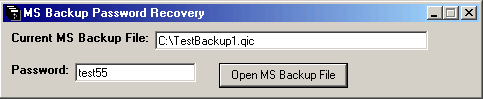
What is a .qic file?
A .qic file is a backup file written in QIC-113 format. A single .qic file contains a collection of files, much like a .zip file. Backup programs insert files into .qic files to gain a number of advantages including:
- Compression, typically cutting storage space for the file in half.
- Spanning, permitting large collections of files to be split across multiple discs.
- Extended attributes, saving long filenames, security, etc. so the files can be restored on any operating system exactly as they were originally.
Related Software Step by Step Guides
and Tutorials:
How to find or recover MSN Messenger and Windows Messenger passwords?
How to recover Outlook Express Emails with DBX files recovery software?
How to recover NTFS files with NTFS data recovery software?
how to recover contact information from the Windows Address Book?
How to recover Deleted PST, WAB, PAB, DBX, Hotmail, Yahoo Email?
How to find or recover ICQ password step by step?
How to recover files from formatted hard drives?
How to repire PST Files in Outlook with Outlook PST Repair Tools?
How to recover deleted and emptied trash bin files on Mac OS X?
How to restore the system file?
|

 RSS Feeds
BBS Forum
RSS Feeds
BBS Forum










