 How to split AVI, DivX, XviD with Quick AVI Splitter? How to split AVI, DivX, XviD with Quick AVI Splitter?
Quick AVI Splitter can split all formats of AVI file such as Uncompressed, MS Video 1, DivX, XviD, MPEG4, Cinepak and so on.
Function 1: Extract selected segment of the AVI video file.
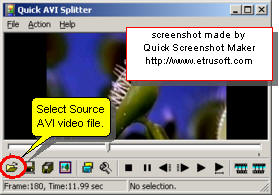
Step1. Please download Quick AVI Splitter and install this software. Click the "Open" button to select the source AVI video file.
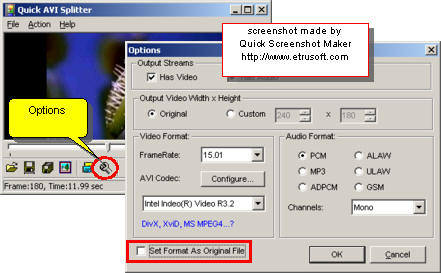
Step2. Click the "Options" button to open the Options Dialog. Set the output AVI video format and audio format. You'd better use "Set Format as Original File" function.
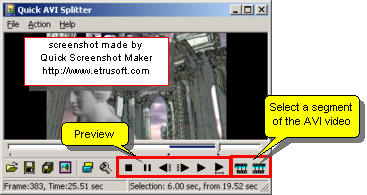
Step3. Use the playback buttons to preview the AVI video file. Use "Selection Start" and "Selection End" buttons to select a segment of the AVI video.
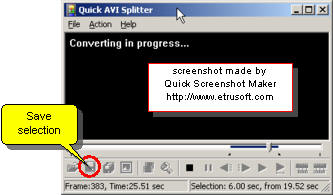
Step4. Click the "Save Selection" button to export selected segment of source AVI video file to new AVI video file.
Function 2: Split source AVI video file to equal-size parts of AVI video files.
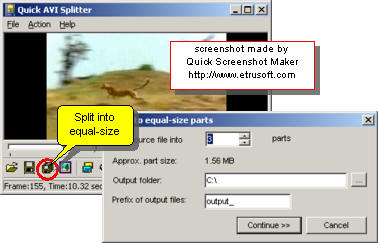
Click the "Split into equal-size parts" button to split the source AVI video file into equal-size parts of AVI video clip files.
Related Software
Step by Step Guides and Tutorials:
How to convert AVI MPEG 3GP VOB MOV to DPG videos for playing on DS?
How to convert MOD to AVI, MPEG, WMV, MP4 with MOD converter
How to convert mod to AVI with MOD2AVI converter?
How to convert OGM to AVI/MP4/DVD/MOV with OGM converter?
How to cut or split MP3 files with MP3 splitter?
How to split MPEG, MPG, SVCD, DVD, VCD with Quick MPEG Splitter step by step?
How to convert video files to iPod format step by step?
How to convert RA to MP3, RM to MP3 with RA RM to MP3 Converter?
How to convert DVD to RM RMVB with DVD to RM RMVB converter?
How to convert DVD to Apple TV format MP4 M4V (MPEG-4) H.264?
|

 RSS Feeds
BBS Forum
RSS Feeds
BBS Forum











