 How to write(burn) video DVD folder(s) to DVD? How to write(burn) video DVD folder(s) to DVD?
AVS DVD Copy is a compact and fully functional application that lets the user copy, clone or compile own CDs, DVDs and new generation Blu-Ray discs. It also supports shrinking DVD video to let the user backup a double layer video DVD onto one single layer DVD±R/RW and burning previously saved ISO images onto different types of optical discs.
Step1. Please download AVS DVD Copy from http://www.qweas.com/download/video_dvd/dvd_backup/avs_dvd_copy.htm and install it.
Step2. Launch AVS DVD Copy
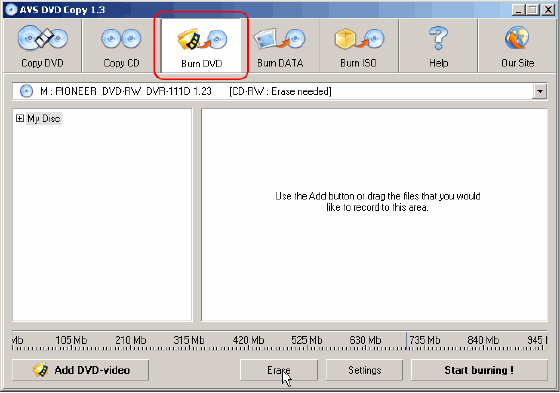
To start the AVS DVD Copy .Click the "Burn DVD" button along the top of the interface. AVS DVD Copy interface is very simple. You can make all actions in the same window: select an output drive, add files and folders to be written to DVD or CD and erase data from not-empty discs. As soon as you are ready just click the Start burning! button to write files to DVD.
Step3. Select Output CD/DVD Burner
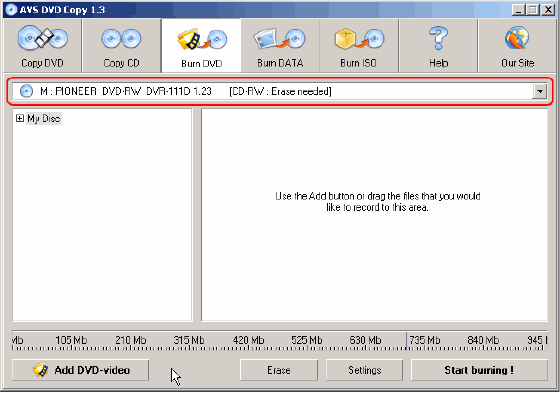
Click the highlighted combo box (see the picture) along the top of the interface to select the output CD/DVD burner.
Step4. Add Files and Folders
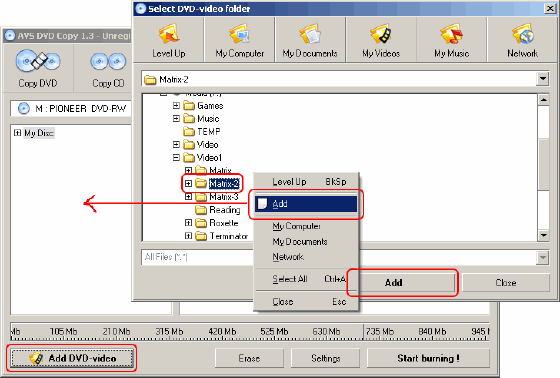
Click the "Add DVD-video" button. In the new window select a VIDEO_TS folder you want to write. Next click Add or make right mouse button and select the Add point from the menu or just drug-and-drop files and folders from this window to main AVS DVD Copy window.
Step5. Insert Disc. Erase, If Not Empty.
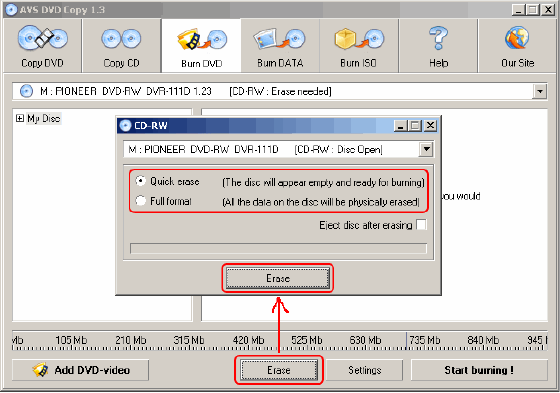
Insert a DVD disc to the drive. If it is not empty, click the Erase button along the bottom of the interface. Select "Quick erase", then click the Erase button in the new window. Wait a minute to complete erasing. Close this window.
Step6. Write Files to DVD
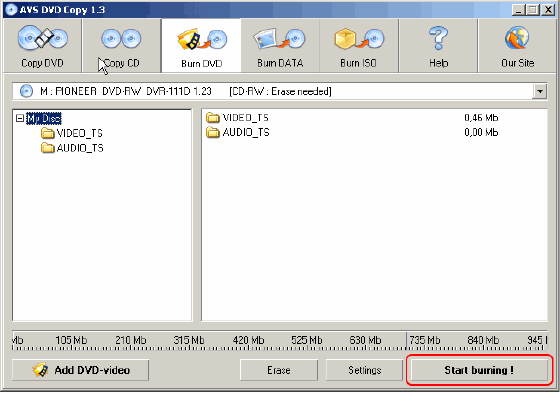
Now you are ready. Just click the Start burning! button in the right bottom corner of the interface.
That's all. Your DVD will be ready in several minutes.
Related
Software Step by Step Guides and Tutorials:
How to clone DVD and Perfect 1:1 DVD Clone?
How to rip Blu Ray to MKV with Blu Ray to MKV converter?
How to burn camera videos like M2TS/M2T/MTS to Blu-ray?
How to rip DVD and put DVD on Zune step by step?
How to burn ISO to CD/DVD with ISO to CD/DVD burner software?
How to rip/convert DVD to 3GP2 M4A OGG AC3 AAC RA AU etc. on Mac?
How to rip/convert DVD to iPod step by step?
How to rip DVD to 3gp with ImToo DVD to 3GP Converter?
How to copy DVD 9 to DVD 5, brun DVD 9 to DVD 5?
How to to burn files and folders to CD and DVD on-the-fly?
How to convert or rip DVD to VCD?
|

 RSS Feeds
BBS Forum
RSS Feeds
BBS Forum











