 How to rip DVD movie to 3GP, IFO to 3GP on Mac step by step? How to rip DVD movie to 3GP, IFO to 3GP on Mac step by step?
iSkysoft DVD to 3GP Converter for Mac is an easy-to-use Mac DVD to 3GP Converter which can rip DVD movie to 3GP, IFO to 3GP to play on video cell phones. And it can trim the length of any title or chapter to convert your favorite clips only.
The detailed steps are as follows:
Step1. Please download iSkysoft DVD to 3GP Converter for Mac, install and run it.
Step2. Import DVD Movie
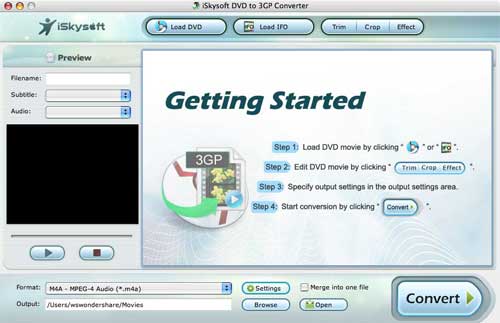
Click the Load DVD button, browse your computer, find the DVD folder of the movie you want to add from your hard disc or DVD-ROM, open your DVD folder, select the VIDEO_TS folder and click OK.
Or, click the Load IFO button, browse your computer, find the DVD folder of the movie you want to add from your hard disc or DVD-ROM, open your DVD folder, open the VIDEO_TS folder, select all the IFO files and click OK.
After you add your movie, you can choose any titles or chapters that you want to convert by ticking the check boxes before them.
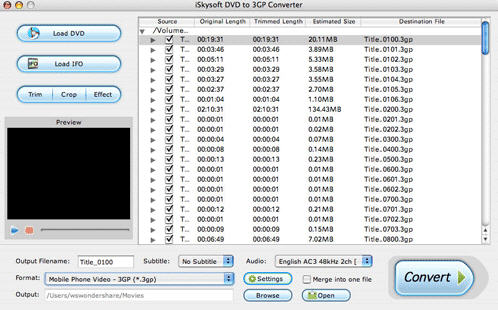
Step3. Output Settings
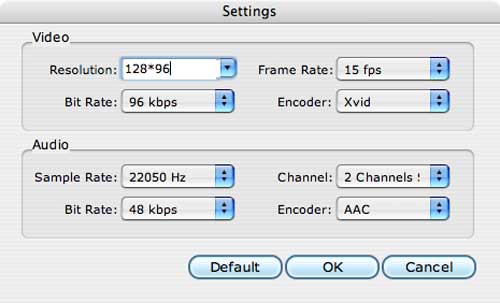
At the bottom of the main window, you can name the output file for the current title/chapter, and select a subtitle to put on your movie, select an audio track. Then finish all the settings including selecting an output format,etc,clicking the Settings button to set the video and audio encoding settings, choose if to merge the selected titles or chapters into one file, and set an output directory to save the output files.
Step4. Start Conversion
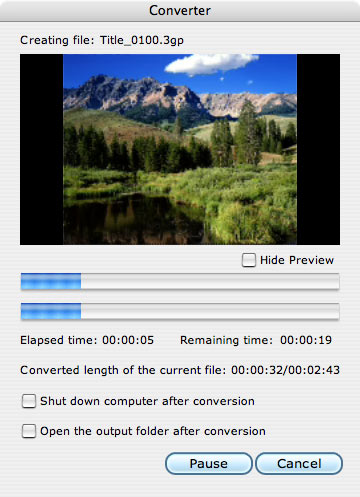
After setting the output settings, you can just click the Convert button to start converting your Movie. You can choose to shut down your computer or open the output folder after conversion so you don’t have to sit before your computer waiting for the conversion to finish.
More Mac Software:
 Mac
Software - Audio & video software for Mac, Parallels desktop for Mac, Flash software & graphic software for Mac etc. Mac
Software - Audio & video software for Mac, Parallels desktop for Mac, Flash software & graphic software for Mac etc. |
 Mac
Video Tools - Mac DVD ripper, Mac DVD
to iPhone iPod MP4 video converter, Mac DVD copy, Mac DVD Creator etc. Mac
Video Tools - Mac DVD ripper, Mac DVD
to iPhone iPod MP4 video converter, Mac DVD copy, Mac DVD Creator etc. |
Related
Software Step by Step Guides and Tutorials:
How to burn Mpeg DivX XviD WMV ASF MP4 AVI to DVD on Mac?
How to convert MPEG WMV VOB MP4 AVI to iPhone Movies on Mac?
How to convert DVD to MP4 on Mac step by step?
How to convert AVI MPEG MP4 to PS3 iPod FLV Apple TV Zune etc. on Mac?
How to convert AVI MOV WMV 3GP MP4 VOB MPEG to iPod on Mac?
How to convert MPEG MOV 3GP VOB AVI to MP4 M4A AAC on Mac?
How to convert/rip DVD to MPEG MOV AVI MP4 WMV Blackberry etc. on Mac?
How to remove DRM from iTunes, crack DRM on Mac?
|

 RSS Feeds
BBS Forum
RSS Feeds
BBS Forum











