 How to convert PowerPoint to Video, PPT to AVI? How to convert PowerPoint to Video, PPT to AVI?
The page will show you how to convert PowerPoint to Video, PPT to AVI step by step with PowerPoint to Video.
PowerPoint to Video converts PowerPoint presentations into video [AVI] file. It can nearly keep all the original animations and special effects in your PowerPoint file on the video file. and can attached the sound from microphone, CD player, background music etc.
At first, please download PowerPoint to Video and install it; you can know more about it by visiting here: http://www.qweas.com/download/business/presentation_tools/powerpoint_to_video.htm
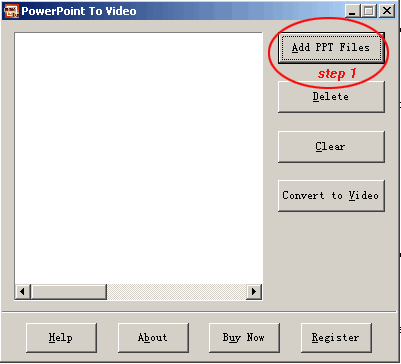
Step1. Add .ppt files.
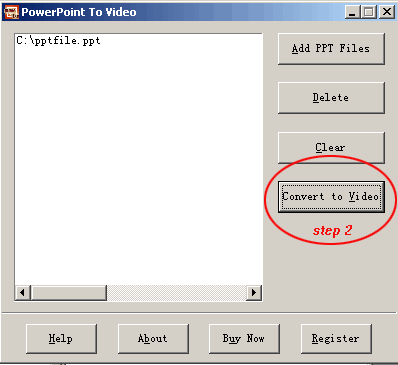
Step2. Click on "Convert to Video" button.
Step3. Set output video option.
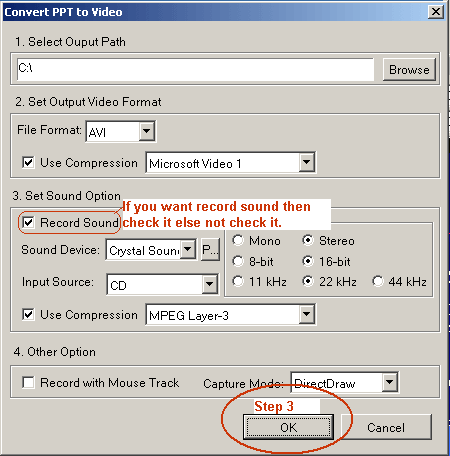
Step4. Set output video size.

Step5. Click on "R" button Strat record.
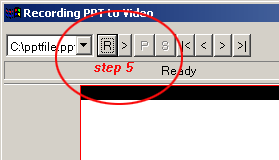
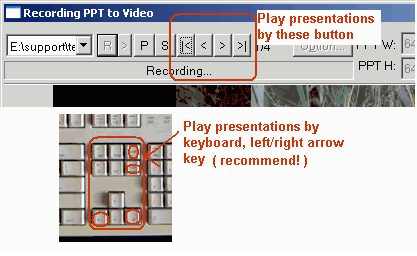
Step6. Play PowerPoint Presentations.
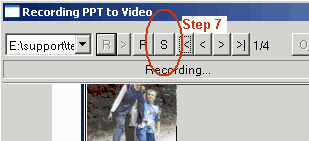
Step7. Click on "S" button stop record.
Related
Software Step by Step Guides and Tutorials:
How to to burn files and folders to CD and DVD on-the-fly?
How to burn IMG to DVD with IMG to DVD burner?
How to convert PPT to PDF, PPT to DVD, PPT to AVI with PPT converter?
How to burn ISO to CD/DVD with ISO to CD/DVD burner software?
How to transfer photo to DVD, create slide show on DVD?
How to convert BIN CUE files to AVI with BIN to AVI covnerter?
How to open rar/hqx/bin/tar/mime/pf files on Mac?
How to quickly create an new ISO files or an new CD/DVD?
how to convert NRG to ISO with NRG to ISO Converter?
How to recover corrupted Zip files with Zip repair tool?
|

 RSS Feeds
BBS Forum
RSS Feeds
BBS Forum











