 How to Reduce Clicks And Pops From A Record? How to Reduce Clicks And Pops From A Record?
Spin It Again is a piece of powerful software that can
easily Record your old vinyl records and cassettes to CD.
Step1. Download Spin
It Again from http://www.qweas.com/download/audio_mp3/audio_cd_burners/spin_it_again.htm
and install it on your PC.
Step2. Load An Existing Recording or Record An LP
Run the software and click "Load A Sound File" or go through the steps to
record an LP
Step3. Select A Click & Pop Reduction Effect
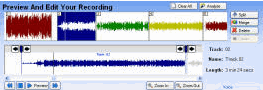
On the bottom of the "Preview And Edit Your Recording" screen, you will be able to choose Cleaning & Effect Processing. Choose "Just Clicks & Pops" from the drop down box.
Related Software Step by Step Guides
and Tutorials:
How To Reduce Tape Noise Hiss?
How to reduce the size of video files?
How to convert MSN Music to MP3 step by step?
How to convert Napster protected music to MP3, iPod step by step?
How to cut or split MP3 files with MP3 splitter?
How to convert Rhapsody Music to MP3 step by step?
How to burn music Audio CD with Fx Magic Music step by step?
How to convert cd to mmf, mp3, amr, wav ringtone?
How to extract DVD audio tracks to MP3 step by step?
How to record LPs and Tapes To CDs?
How to rip CD to MP3 step by step?
|

 RSS Feeds
BBS Forum
RSS Feeds
BBS Forum










