 How to Recover Encrypted file on NTFS Drive? How to Recover Encrypted file on NTFS Drive?
Data Recovery Wizard is the reliable data recovery utility that provides you with powerful undelete, data recovery and disk restoration functionality.View and restore deleted files and folders; recover data from formatted, reformatted, corrupted and damaged NTFS and FAT hard drives and partitions.
Encryption is transparent to the user that encrypted the file. This means that you do not have to manually decrypt the encrypted file before you can use it. You can open and change the file as you normally do.
Using EFS is similar to using permissions on files and folders. Both methods can be used to restrict access to data. However, an intruder who gains unauthorized physical access to your encrypted files or folders will be prevented from reading them. If the intruder tries to open or copy your encrypted file or folder he receives an access denied message. Permissions on files and folders do not protect against unauthorized physical attacks.
You encrypt or decrypt a folder or file by setting the encryption property for folders and files just as you set any other attribute such as read-only, compressed, or hidden. If you encrypt a folder, all files and subfolders created in the encrypted folder are automatically encrypted. It is recommended that you encrypt at the folder level.
Step1. Download
EaseUs DataRecoveryWizard from http://www.qweas.com/download/system/data_recovery/easeus_datarecoverywizard.htm
and install it on your PC.
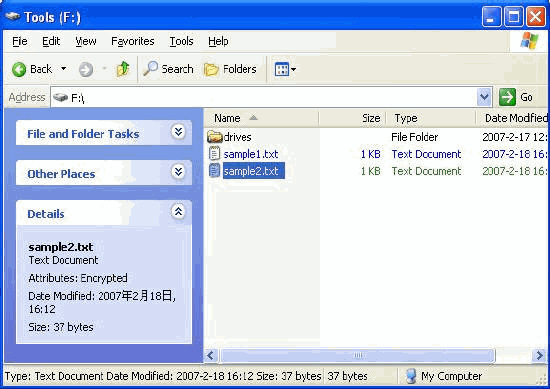
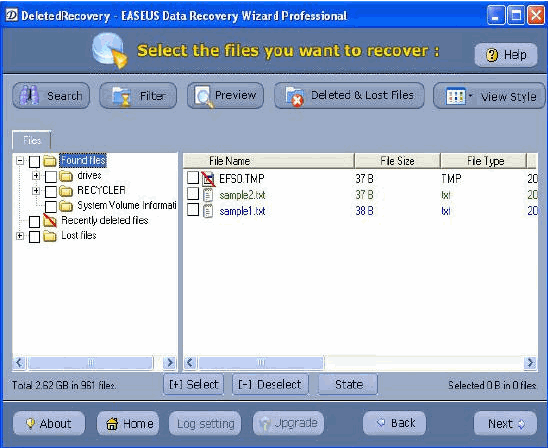
Step2. Data Recovery Wizard Professional can retrieve EFS - encrypted files from NTFS partitions. To retrieve the files, encryption password must be known or SAM database must be present (Windows 2000, XP, 2003). User must have administrator privileges. The green "sample2.txt" is an encrypted files of NTFS drive.
Note:
Does not work with FAT partitions. All recovered encrypted files must be copied to NTFS partition.
Must work on present Windows system.
Does not support Dynamic Disks.
Does not work on files invisible due to user's access rights.
Related
Software Step by Step Guides and Tutorials:
How to save all passwords typed in my Mac in an encrypted file?
How to recover NTFS files with NTFS data recovery software?
How to convert between NTFS to FAT32? NTFS vs FAT32?
How to convert hard disk files between FAT/FAT32 and NTFS format?
How to recover Compressed files on NTFS Drive?
How to recover password for protected MS Backup (*.qic) files?
How to find or recover ICQ password step by step?
How to find or recover MSN Messenger and Windows Messenger passwords?
How to decrypt protected PDF files with PDF Password Recovery software?
|
|
|

 RSS Feeds
BBS Forum
RSS Feeds
BBS Forum











