 How to save or download swf flash aimation file from floating shortcut bar, Internet Explorer Context Menu, or search Flash files in local cache files? How to save or download swf flash aimation file from floating shortcut bar, Internet Explorer Context Menu, or search Flash files in local cache files?
Flash Saver is designed to fulfill your requirement of saving Flash animations to your hard disk by a simple click. It is the tool software to help you download swf files from web pages. It enables you to save all Flash animations from web pages, including Flash websites, Flash game, Flash MTV, Flash Movie, Flash advertisement, or what ever Flash files you find in the web.
Please download Flash Saver and install it; you can know more about it by visiting here: http://www.qweas.com/download/internet/website_downloaders/flash_saver.htm
Save a Flash animation from Floating Shortcut Bar:
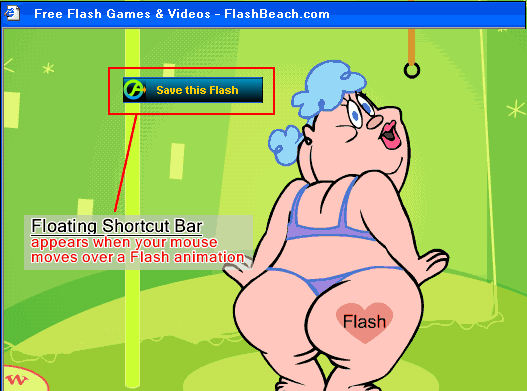
1. Move your mouse over the Flash animation. The Floating Shortcut Bar will appear right over the Flash animation.
2. Click the 'Save this Flash' button, and then choose a Category.
Internet Explorer Context Menu:
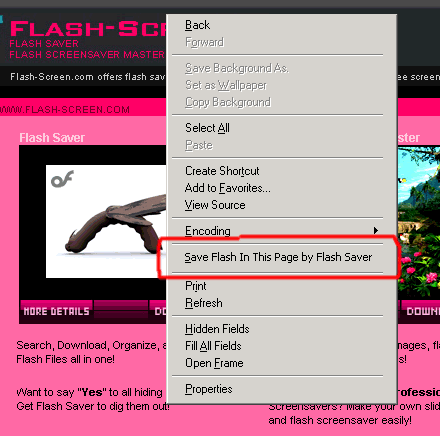
Save a Flash animation from Internet Explorer context menu:
1. Right click on the webpage, click 'Save Flash in This Page by Flash Saver' in the context menu.
2. Flash Saver will analyze the webpage and list the possible Flash animations in the following Window:
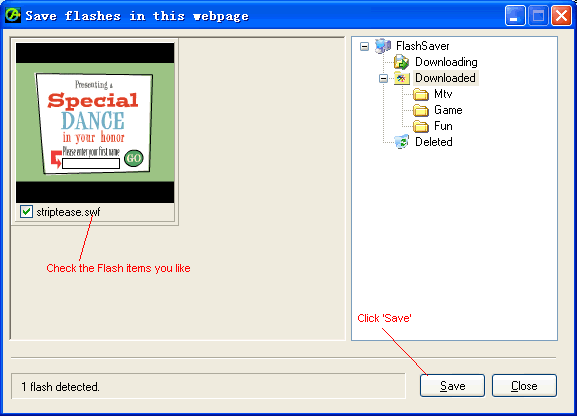
3. Check the Flash items you like in the list.
4. Click 'Save'.
Detect From Cache Window:
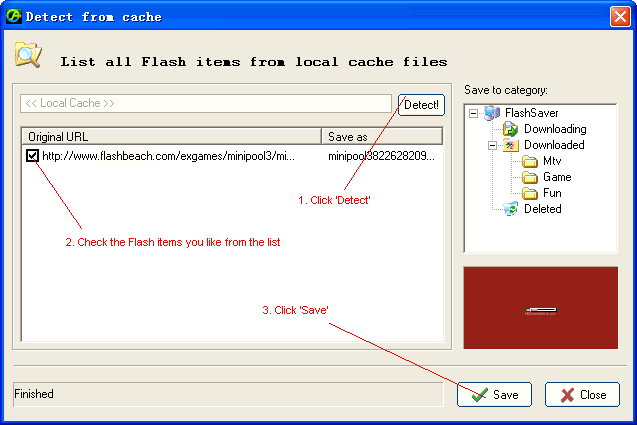
Save a Flash file from Internet Explorer cache files:
1. Click 'Detect'. Flash Saver will automatically analyze local cache files of Internet Explorer and list the possible Flash animations.
2. Check the Flash item you like from the list. You can preview it in the right area.
3. Click 'Save' button to download the Flash item. You can choose a category before saving. Otherwise it will be saved to the 'Downloaded' category.
Related Step by Step Guides and Tutorials:
How to make AMR MMF MP3 Ringtone for mobile?
How to convert MP3 to Ringtone MMF, AMR, WAV, QCP format?
How to convert cd to mmf, mp3, amr, wav ringtone?
How to copy DVD movies with dvdSanta step by step?
How to play DVD movie on my PC step by step?
How to rip DVD and put DVD on Zune step by step?
How to convert Rhapsody Music to MP3 step by step?
How to convert and burn VOB AVI to DVD step by step?
How to split MPEG, MPG, SVCD, DVD, VCD with Quick MPEG Splitter step by step?
How to copy DVD and play on PSP step by step?
|

 RSS Feeds
BBS Forum
RSS Feeds
BBS Forum











