 How to change your voice to a female voice step by step? How to change your voice to a female voice step by step?
This tutorial will give you step-by-step guidance on how to change your voice to a female voice and and how to improve the the output quality with AV Voice Changer Software Diamond Edition. The detailed steps are as follows:
Step1. Please download AV Voice Changer Software Diamond Edition, install and run it; you can know more about it by visiting here: http://www.qweas.com/download/audio_mp3/music_organizers/av_voice_changer_software_diamond_edition.htm
Step2. Download charming lady's voice wav file
Click here to download charming lady's voice..
Step3. Open VCS Comparator
Click on the "Comparator" button to open VCS Comparator.
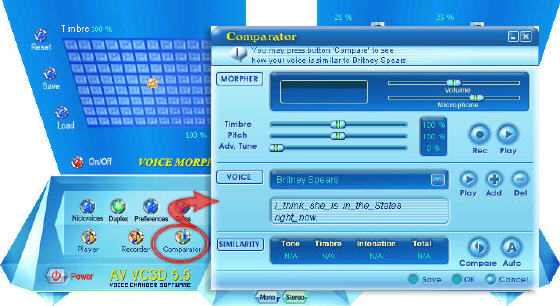
Step4. Import your favorite female WAV file into Comparator
- Click the "Add" button to open the Voice Import panel.
- Click on the "Browse" button and point to the female WAV file location.
- In the Person box, type in a name for the female voice as "My female voice".
- Type what she says in the WAV file into Phrase: "I'm really looking forward to getting to know you better".
- Now, just click the "Import" button to save and close the Import panel.

- We are now on the Comparator panel and what we have done in STEP 4 should now appear in the VOICE frame as below.
Note: Click the "Play" (1) button to listen to your imported WAV file again. To change your WAV file, click the "Add" (2) button again to open the Voice Import panel. Click the Del (3) button to remove the WAV file and your settings in STEP 4.

Step5. Record your voice
- Click the "Rec" (1) button to to start the recording.
Note: if you receive an error message saying that "Cannot make comparison. Please, try to record your voice again.", just close the message and try to record your voice again. After finishing the recording, you can click on the "Play" (2) button to listen to your voice.
- Also the Comparator message (3) is now showing how similar your voice is compared to the imported female voice. You can adjust the Timbre, Pitch and Adv. Tune sliders (Advanced tune) to improve your voice and then click the "Compare"(4) button to see how your adjustment affects the similarity. However, it is recommended that you leave the settings alone and just hit the "Auto" (5) button.

- If you click the "Auto" (5) button, VCS Comparator will now automatically compare the two voices and then suggest to the best settings (it can) in Pitch, Timbre & Adv. Tune that make your voice sound most like a female.
- Click Ok button to close the Comparator and return to the main panel.
Note: If you click Ok, the suggested settings from the Comparator will be applied to the VCS morpher (in real time). Just come back to the Main panel and enjoy the result then. You can also click the Save button to save the suggested settings from the Comparator for later use.

Step6. Improve output quality with Equalizer and Noise Reduction
- Coming back to the VCS main panel, we now see the settings applied.
- Click the "Advanced" button to expand the Advanced panel.
Note: for the first time, you may be satisfied with the result. And, if not, just make slight adjustments to the timbre & pitch cursor around the suggested settings that the Comparator provided to you before.
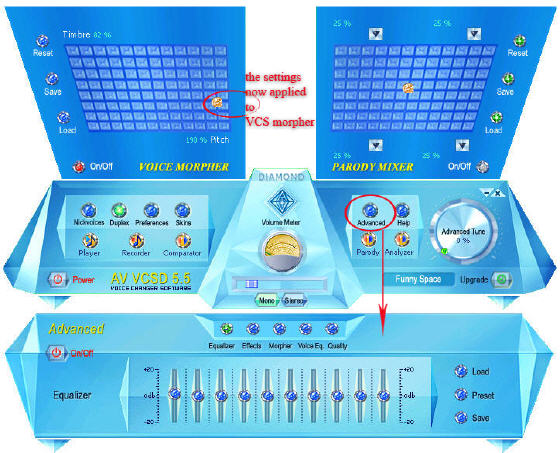
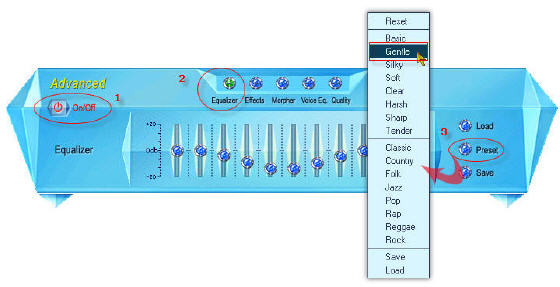
- Turn the Advanced panel (1) on.
- Select the Equalizer (2), click on Preset (3) and select Gentle.
Note: you can select a different Preset but in this case Gentle preset is the best choice.
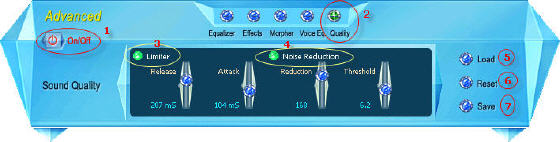
Note: You got your desire voice, but there is still some background noise. Try this session to fix it: Use Save (7) to save your settings for later use. Click Reset (6) to discard your change to the parameters or click Load (5) to load your saved settings.
- Turn the Advanced panel (1) on.
- Select Quality (2).
- Turn the Limiter on (3).
- Turn the Noise Reduction on (3).
- Then, adjust the parameters: Release, Attack, Reduction, and Threshold to get your desire voice.
Related Step by Step Guides and Tutorials:
How to create parody voice with Voice Changer Software Diamond?
How to make professional Audio Books?
How to imitate celebrity voice and other voices?
How to change your voice to a female voice?
How to create ringtone from song?
How to convert video files to iPod format step by step?
How to copy DVD and play on PSP step by step?
How to rip DVD and put DVD on Zune step by step?
|
|
|

 RSS Feeds
BBS Forum
RSS Feeds
BBS Forum











