 How to convert DVD to AVI using DVD to AVI Converter? How to convert DVD to AVI using DVD to AVI Converter?
With this DVD to AVI converter guide you will find a best DVD to AVI converter to convert DVD to AVI easily. Converting DVD to AVI is only a part function of this DVD to AVI converter. Before this conversion, I'd like to introduce some main features of this converter.
Aimersoft DVD to AVI Converter is a powerful DVD ripping program. You can also use this super DVD to AVI Converter to capture your favorite clips and pictures from your DVD movies with absolutely no quality loss. This DVD converter can even merge different titles and chapters from a DVD movie and rip them into one file.
It can convert/rip DVD to AVI, MP4, WMV, MOV, RM, RMVB, MPG, MPEG, 3GP, 3GPP, MPG, ASF, FLV, VOB, WMA, M4A, MP3, AC3, WAV, and so forth. With it, you can easily convert/rip DVD to iPod Video, Zune, iPhone, Apple TV, PSP, Xbox 360, PS3, Archos, iRiver, Creative Zen, PMP, MP4/MP3 Player, Smart Phone, Pocket PC, PDA, Mobile Phone, etc.
Here's a guide which I've compiled to help you convert your favorite DVD to avi.
Step1. Download this DVD to AVI Converter from http://www.qweas.com/download/video_dvd/video_converters/aimersoft_dvd_to_avi_converter.htm Install and run it.
Step2. Click "File -> Load DVD Folder/ Load DVD Rom/ Load IFO File" to add your DVD or DVD files (you saved on your hard drive). Or you can directly click "Load DVD" or "Load File" button to add them.
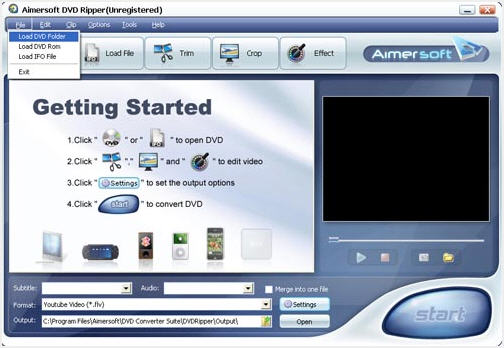
Step3.Click "Subtitle" and "Audio" drop-down list to select your subtitle and audio.
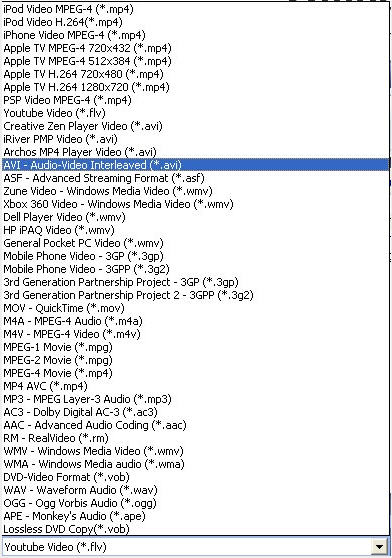
Step4. Click "Format" drop-down list to select your output video format. In this guide, we choose AVI.
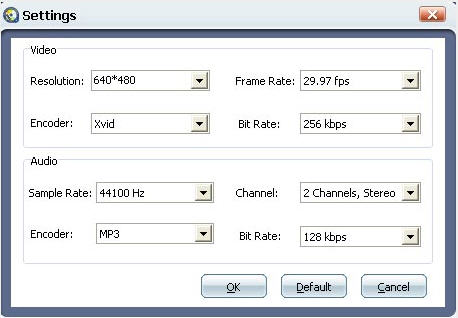
PS : You can change the video or audio settings by clicking the "Settings" button.
Step5. Click "Output" icon to select a place where you want to put your converted AVI files.
Step6. Click "Start" button to covnert your DVDs to AVI video files.
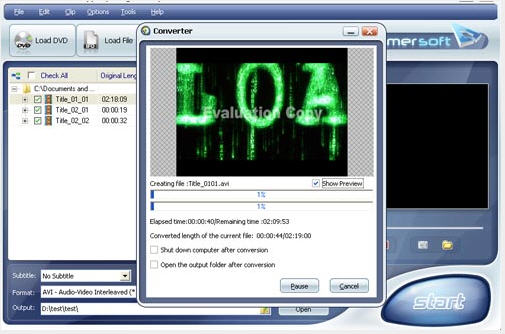
Step7. After finishing the conversion, you can click "Open" button to go to your output folder to watch you converted AVI files.
Ok, now we have successfully finished our DVD to AVI conversion.
Some tips for using this DVD to AVI Converter:
- If you want to cut the black edges of the DVD movie, you can click the "Crop" button, then you will see a pop up windows. There will be a frame in dashed line around the movie video; you can drag it to cut the black edges.
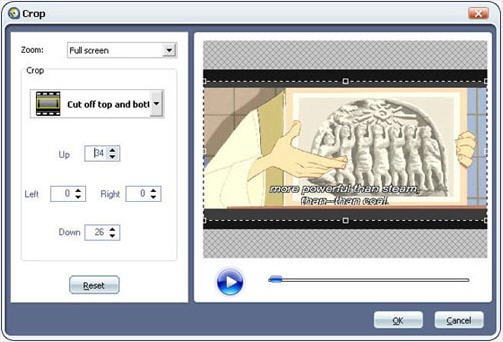
More over, you can click the Crop drop-down list to select a Crop model you prefer, for example: "Cut off top and bottom black edges". You can even type the number in the box to cut off black border accurately.
- If you want to combine several DVD chapters into one file. You can check the "Merge into one file" check box on the main interface, then you will get one output file instead of several files by chapters.
- If you want some snapshot of your DVD, click the "Snapshot" camera icon on the right panel when previewing your DVD movie. And click the folder icon to go to the picture folder, then you will see them. This converter supports output picture as JPEG or BMP format.
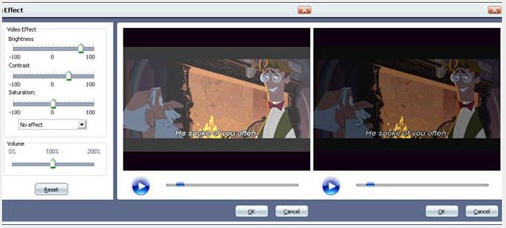
- You can click the "Effect" button to customize the brightness, saturation, contrast, volume, etc. You can even apply special effects such as "Emboss", "Negative", "Old film" and "Gray" by selecting an effect from drop-down list.
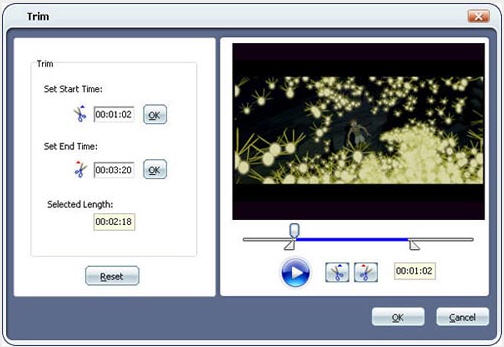
- If you only want to convert a part of the DVD, you can click "Trim" button to go to the Trim panel to set the start time and End time for your clip.
Ok, you have completed DVD to AVI conversion.
This DVD to AVI Converter is really cool. Just download the free trial of this converter to convert your DVD to AVI videos yourself!
Related
Software Step by Step Guides and Tutorials:
How to rip DVD and put DVD on Zune step by step?
How to transfer photo to DVD, create slide show on DVD?
How to convert AVI, WMV, MPG, ASF, MPEG to Flash step by step?
How to convert DivX to iPod step by step?
How to convert XviD to DVD, WMV to DVD step by step?
How to convert DVD to MP3, WMV, WMA?
How to convert/rip DVD movie to BlackBerry AVI?
How to burn MPEG file to DVD Movie step by step?
How to brun/convert RM to DVD, RMVB to DVD?
How to convert AVI to iPhone MPEG4 for mac?
|

 RSS Feeds
BBS Forum
RSS Feeds
BBS Forum











